 Pay for your PC in installments (up to 12 payments)
You’ve seen “DLSS 4.5”, “Multi Frame Generation 6X”, “FSR Redstone” everywhere since CES 2026… but in practice, what does it change in games?
Does it really give you higher FPS, a cleaner image, or is it just a counter going up? And most importantly: how to enable it correctly so you don’t end up with ghosting, flicker, or a feeling of latency?
In this guide, we’ll clarify what NVIDIA actually announced with DLSS 4.5, how to use it right now via the driver and the NVIDIA app, and what AMD is promising with FSR “Redstone” on the Radeon side.
- DLSS 4.5: what really changes
- RTX compatibility: 20 / 30 / 40 / 50
- How to enable DLSS 4.5 now?
- DLSS 4.5 vs FSR
-
Recommended settings (e-sports / AAA / mix)
DLSS 4.5: the 2 real updates (and why they matter)
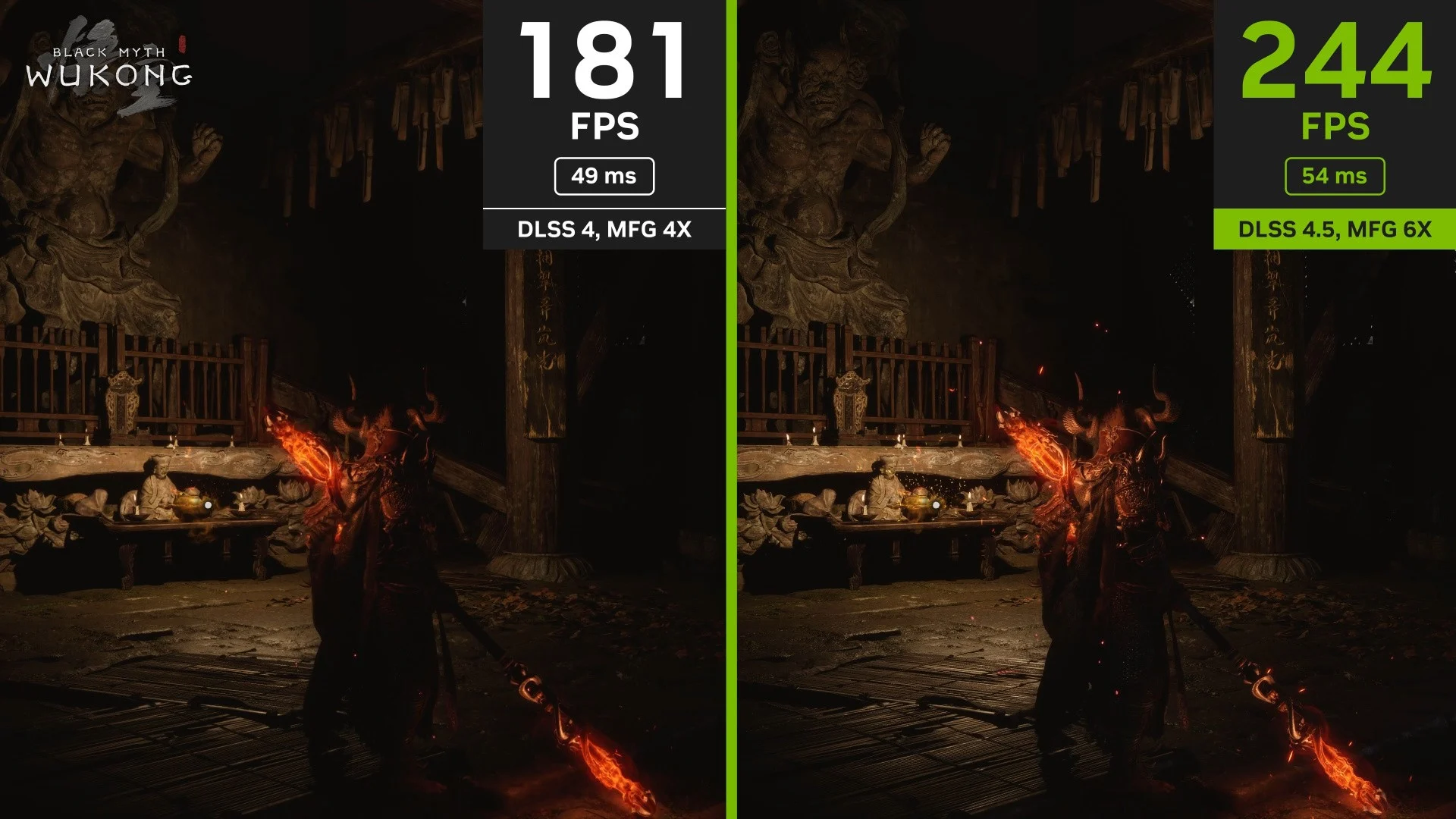
DLSS 4.5, announced at CES 2026, is built around two things: better Super Resolution (image quality) + Multi Frame Generation goes further (smoothness).
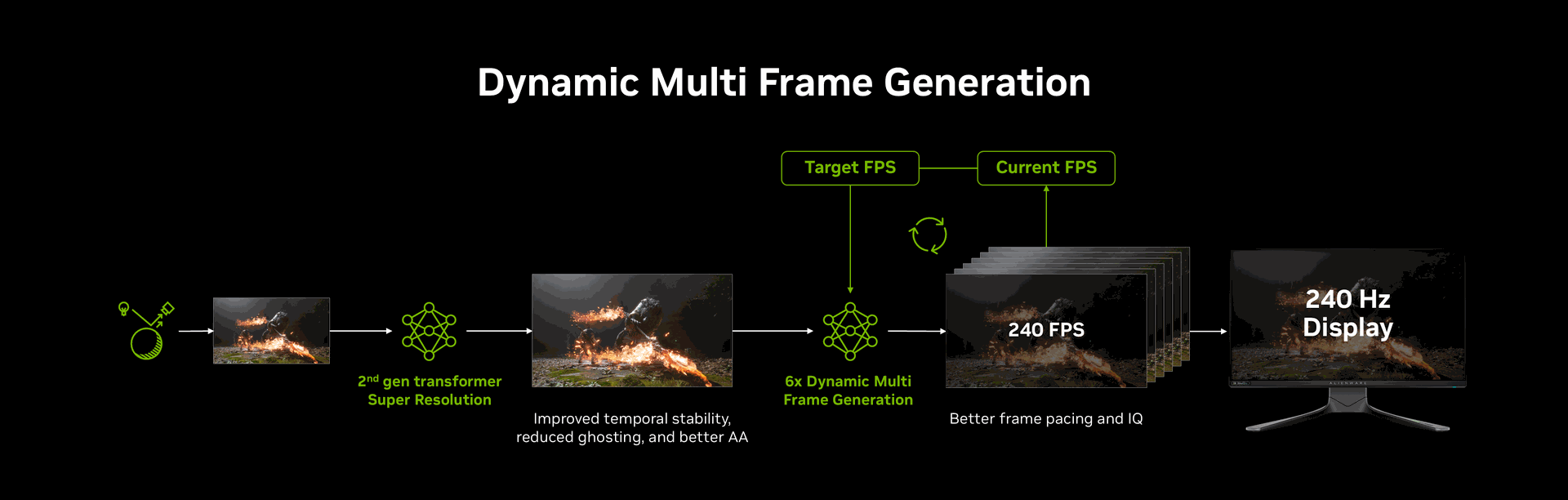
1) Super Resolution “2nd gen transformer”: the quality upgrade (not just FPS)
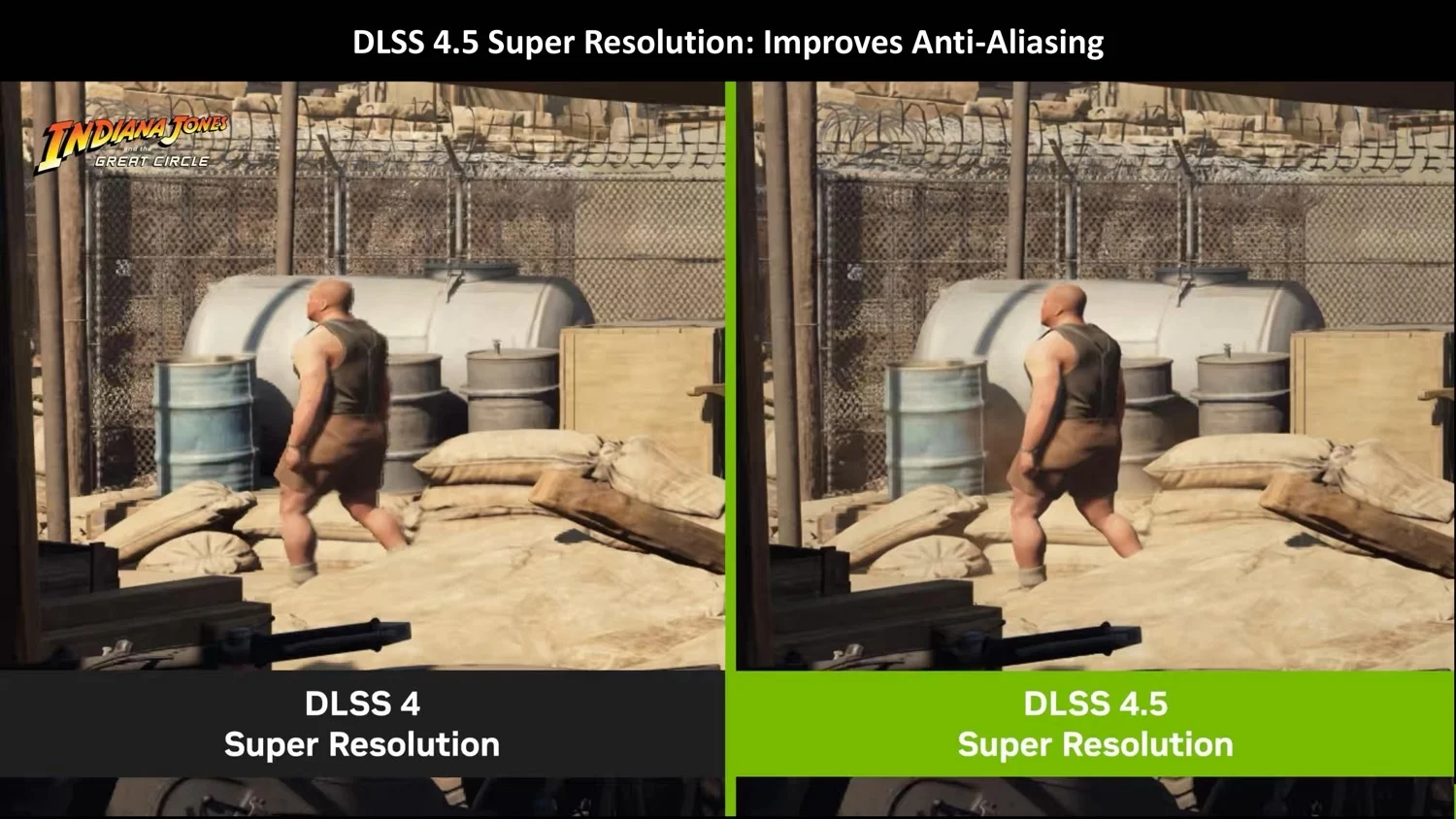
NVIDIA is talking about a 2nd-generation transformer model for Super Resolution, with the promise of:
- better temporal stability (less flicker/shimmering on fine surfaces)
- less ghosting (trails behind nearby objects, weapons, etc.)
- AA and details cleaner in certain scenes (particles, lighting, edges)
Honestly, it’s often this that makes the difference between “DLSS OK” and “DLSS incredible”: when you move the camera, when you have foliage, fencing/grids, particles, small text… where the artefacts jump straight into your face.
2) Multi Frame Generation: 6X mode + dynamic mode (but not for everyone)
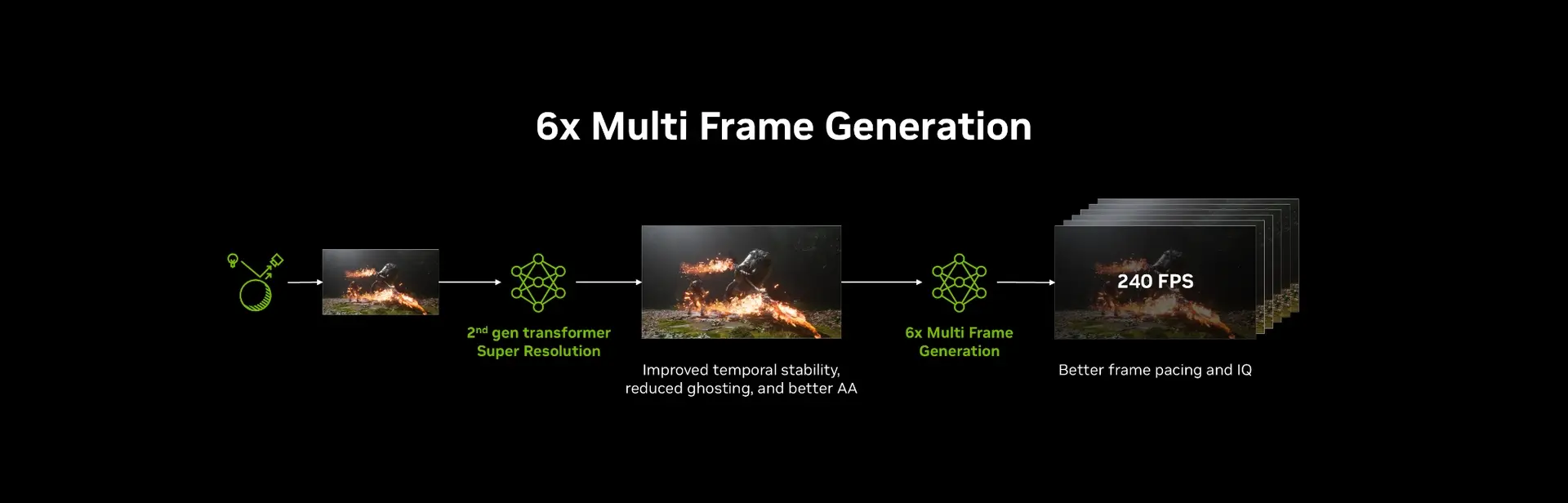
DLSS 4.5 introduces a 6X mode (up to 5 generated frames for 1 rendered frame) and a Dynamic Multi Frame Generation that adjusts the multiplier automatically.
Two key points:
- NVIDIA and the tech press reiterate that frame gen works best when your base FPS is already solid (typically to take advantage of very high Hz displays). (typically to take advantage of very high Hz displays).
- The dynamic / 6X mode is announced for spring 2026 and reserved for RTX 50 (at this stage).
DLSS 4.5 compatibility: RTX 20/30/40/50, yes… but not on the same level
Good news: DLSS 4.5 (Super Resolution) is announced as compatible with all RTX.
The nuance—and it matters: the new model is heavier, and NVIDIA highlights benefits on RTX 40/50 thanks to Tensor Core acceleration (FP8), whereas RTX 20/30 could see a more noticeable performance cost.
So:
- RTX 50: access to the future “6X + dynamic” (spring) + optimal performance (target “ultra high Hz”).
- RTX 40: a very good candidate for DLSS 4.5 Super Resolution (and classic frame gen depending on the game).
- RTX 20/30: it can be excellent in quality… but you need to check whether the performance cost is worth the trade-off.
How to enable DLSS 4.5 right now (step by step, without getting lost)
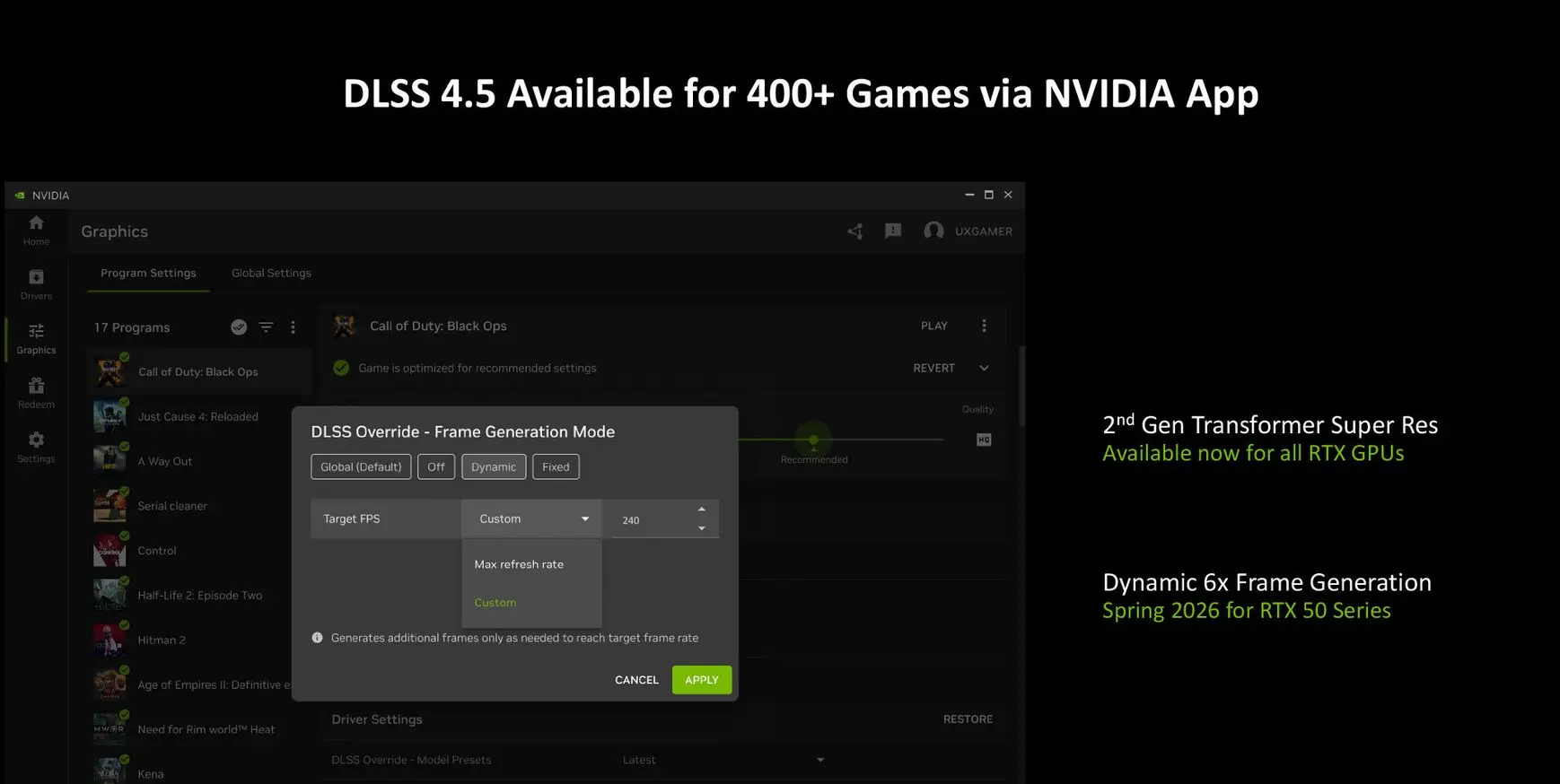
DLSS 4.5 Super Resolution is available via Game Ready driver and NVIDIA App (beta), with an “Latest” override system that can improve more than 400 games and apps.
Step 1: install the right driver
- Install the GeForce Game Ready Driver 591.74 (mentioned “Game Ready for DLSS 4.5”).
Step 2 : NVIDIA App (beta) to enable the DLSS 4.5 override
NVIDIA says the “official” app update arrives on 13 January 2026, but DLSS 4.5 SR can be used before that via the beta opt-in.
Step 3: apply “DLSS Override” (global or per game)
In the NVIDIA app:
- Go to the “Graphics” tab
- Choose a game OR “Global Settings”
- Scroll down to the DLSS Override options
- Set “Model Presets” to Latest (or “Custom” if you want to control it)
Remember: this is the fastest way to test DLSS 4.5 even before each game rolls out a native update.
FSR “Redstone”: what AMD is announcing (and what we still don’t know)
AMD announces FSR “Redstone” as an evolution, bringing ML frame generation + ML upscaling for Radeon, positioned as a step towards a more complete “AI” stack.
And that’s where we need to be honest: the level of publicly available detail is still even more limited than on NVIDIA’s side (at the time you’re reading this article). In AMD’s announcement, we don’t have a full matrix of “GPU support / exact mode / quality / latency / day-one games” comparable to NVIDIA DLSS 4.5’s communication.
What you can take away, without overthinking:
- AMD puts explicit emphasis on ML (it’s no longer just “shader-based” in spirit).
- The 2026 challenge, on the Radeon side, is clearly to improve upscaling quality and frame generation against DLSS, in the AAA titles that actually matter.
DLSS 4.5 vs FSR Redstone: how to decide without being a fanboy (3 simple cases)
Let’s not kid ourselves: your best choice depends mostly on your graphics card and your FPS goal.
Case 1: you’re gaming on RTX (especially RTX 40/50)
- DLSS 4.5 Super Resolution is the #1 test to do, especially if you’re sensitive to image issues (shimmering/ghosting).
- If you’re targeting a very high Hz display, “6X + dynamic” is something to watch on RTX 50 (but not “today”).
Case 2: you’re gaming on RTX 20/30 and want a “cleaner” image
Yes, you can try DLSS 4.5 SR… but run a performance test: the model is being positioned as more demanding, and the press suggests the impact could be more noticeable on these generations.
Case 3: you’re gaming on Radeon, and you’re on the fence about switching
FSR “Redstone” is being billed as the AMD “ML” follow-up to watch. But until we have comparable details (quality/latency/compatibility), the right move is:
- choose based on raw performance + price, and treat upscaling/frame gen as an evolvable bonus over the 2026 cycle.
Recommended settings (by use case)
e-sports / competitive FPS (goal: responsiveness + clarity)
- Priority: perceived latency + clarity
- If you’re already running high FPS: DLSS 4.5 SR can give you a more stable image without costing too much (to be checked).
- If you’re chasing 240/360 Hz: keep an eye on the arrival of Dynamic MFG (RTX 50), but don’t treat it as “current” at the time of publishing.
AAA (1440p/4K, RT) (goal: performance + image quality)
- DLSS 4.5 SR is often a “no-brainer” if it removes shimmer/ghosting.
- Frame gen: useful if you already have a healthy base FPS, but watch how it feels (not all games are the same).
“Mixed” PC use (gaming + creation): stability first
- Prioritise settings that improve the image without distorting the rendering (DLSS SR “Latest” via override, then fine-tune).
The pitfalls (and how to avoid them)
- Ghosting : often visible on nearby objects / high contrast → compare 2 fixed scenes before/after.
- Shimmer/flicker on thin surfaces : DLSS 4.5 promises improvements in temporal stability, but test your game (different engine = different results).
- “Inflated FPS” vs real feel : if your baseline is too low, image generation doesn’t magically turn the input into “instant”. The press highlights this point (and they’re right).
- RTX 20/30 : possible quality vs performance trade-off → if you lose too much, go back to the previous model via the app (override).
[POPUP NEWSLETTER HERE : “Driver alerts, DLSS/FSR updates, GPU/PC price drops, FlowUP drops”]
Discover our DLSS 4.5 ready PCs!
Conclusion
If you have an RTX, DLSS 4.5 Super Resolution is the most interesting update right now : better image quality, potentially fewer artefacts, and quick to test via the driver + the NVIDIA App override.
If you’re on RTX 50, keep an eye on the 6X + Dynamic Multi Frame Generation (spring 2026) : it’s clearly aimed at 240 Hz setups and above.
On the AMD side, FSR “Redstone” signals a serious “ML” direction, but until we have the full picture (compatibility/quality/latency/games), the smartest move is to decide first based on the performance-to-price ratio of your setup.
FAQ
NVIDIA announces DLSS 4.5 Super Resolution compatibility on RTX, including older generations, but the performance impact may vary depending on the graphics card.
You can use the override in the NVIDIA app ("DLSS Override / Latest") after installing the compatible driver.
NVIDIA is communicating a “Spring 2026” availability for the 6X/dynamic mode, and RTX 50 exclusivity at this stage.
The feel can change : frame gen is generally more convincing when your FPS baseline is already high. It’s not a miracle solution if you start out too low.
AMD positions FSR “Redstone” as an ML evolution (upscaling + frame gen). But the level of publicly available detail isn’t yet as complete as DLSS 4.5.
NVIDIA highlights “over 400 games and apps” via the override in the app.
