 Pay for your PC in installments (up to 12 payments)
Multiply your performance by 4?
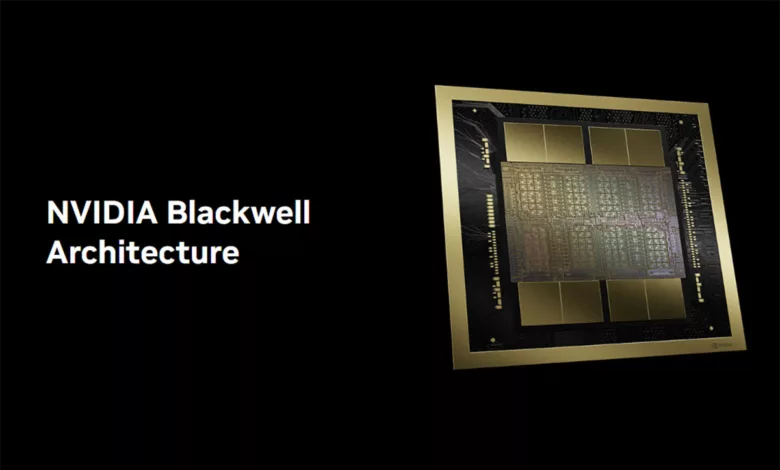
The NVIDIA Blackwell architecture, introduced in the RTX 5000 series, pushes graphical performance and the integration of AI into games and creation to levels never seen before.
Designed to meet the growing needs of gamers and creators, this architecture includes major advances in computing, visual optimisation, and interactivity.
Boosting performance thanks to DLSS 4 and Multi Frame Generation
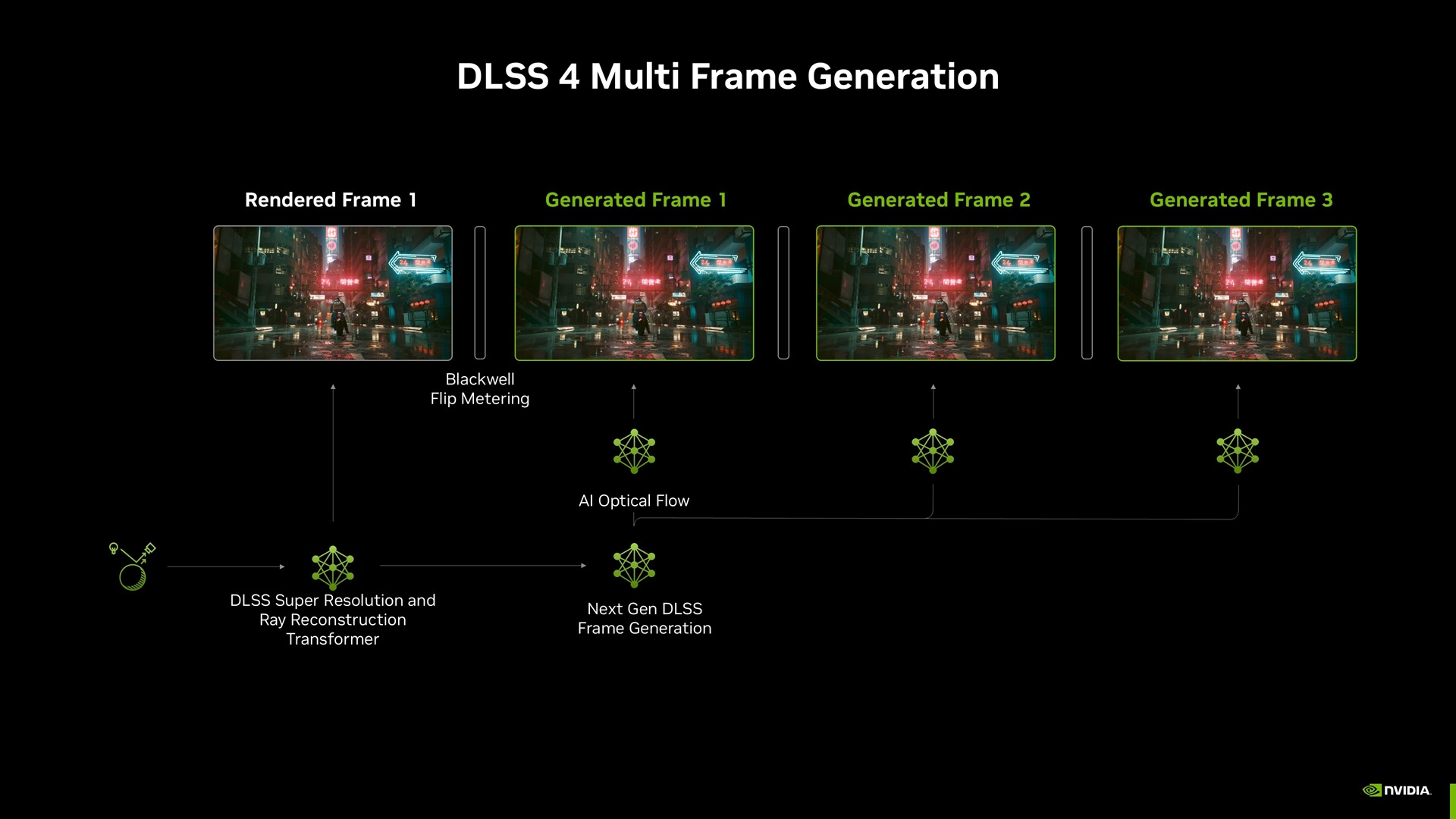
One of Blackwell’s key strengths is the integration of the DLSS 4 (Deep Learning Super Sampling), which is built on advances in artificial intelligence. Among these new features, Multi Frame Generation makes it possible to generate up to three additional images per rendered “normal” frame, resulting in a dramatic improvement in smoothness and performance.
In games like Cyberpunk 2077, DLSS 4 with Multi Frame Generation multiplies FPS by 8 while delivering a better visual quality than native rendering.
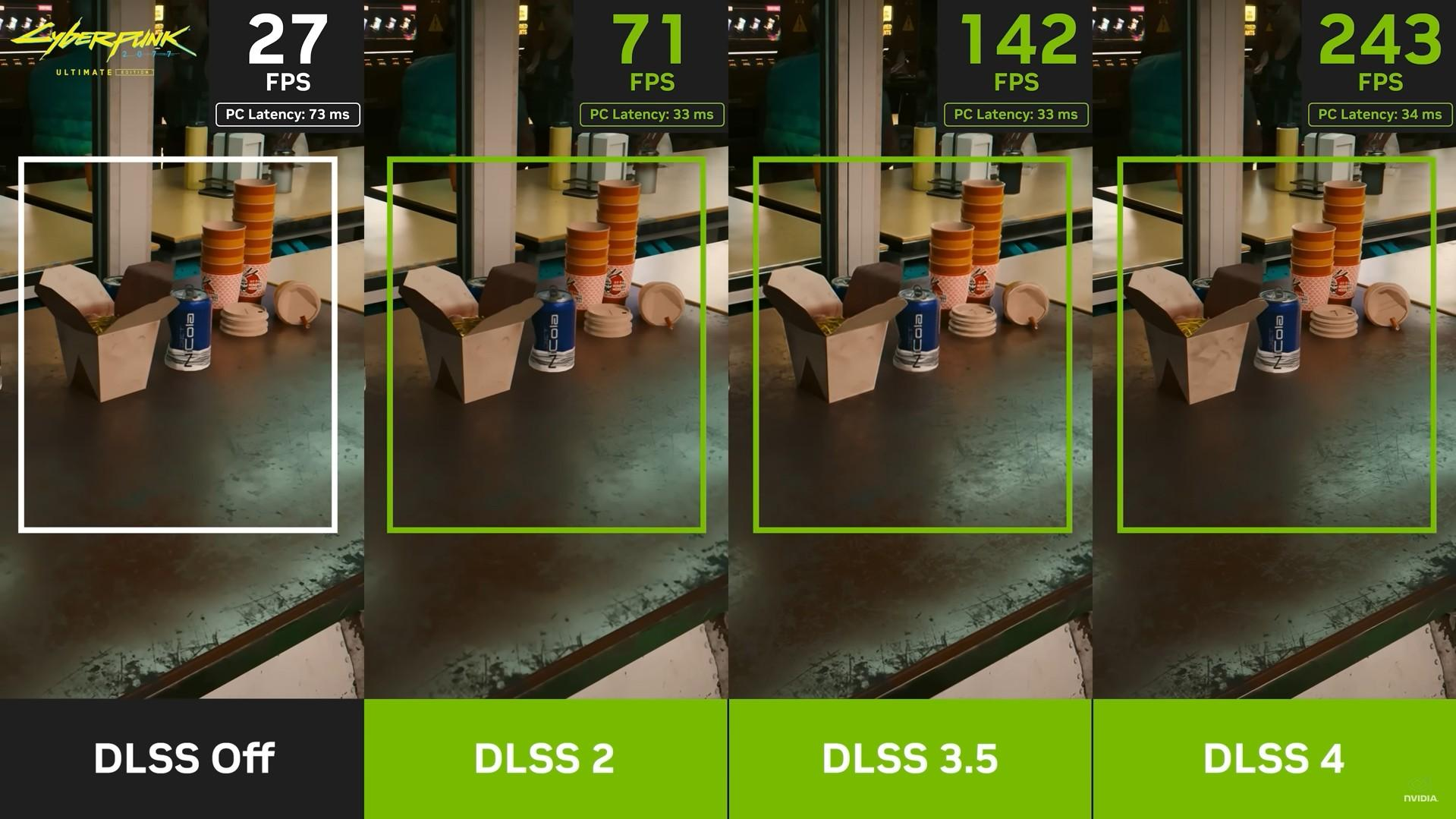
This impressive result is made possible thanks to integration of Transformer models, which analyse the entire scene to optimise every image. This allows you to play at 4K and 240 FPS with full ray tracing—an achievement that was once impossible without sacrificing visual detail.
A frame (or an image in English) is a still image which, when shown successively with others, creates the illusion of motion in a video or video game. Imagine an animation book where each page represents a step in a movement: each page is a frame, and when you flip through them quickly, it gives the impression that the drawings come to life.
In the context of a video game, a frame represents everything that is displayed on screen at a given moment: characters, environments, visual effects, and so on.
FPS stands for “Frames Per Second” (frames per second) in English. It refers to the number of frames the computer or console can generate and display on screen each second. The higher this number, the smoother the action feels. For example:
- At 30 FPS, the game is playable, but movements can look a bit choppy.
- At 60 FPS, the experience is smooth and enjoyable.
- At 120 FPS or more, smoothness is at its best and becomes especially noticeable in competitive games.
FPS depend on the power of the graphics card, the processor, and the display. A card like the RTX 5000, thanks to technologies such as DLSS 4, can reach impressive figures—for example, 240 FPS in 4K—even in very demanding games.
4K is a screen resolution—i.e., the number of pixels displayed on a screen. In 4K, there are 3840 pixels across and 2160 pixels down, for a total of around 8.3 million pixels. This represents a far higher density of information than lower resolutions such as the 1080p (Full HD), which has 1920 x 1080 pixels (around 2 million pixels).
Reducing latency with NVIDIA Reflex 2
Latency, or the delay between an action (such as a mouse click) and the game registering it, is a crucial factor for competitive gaming.
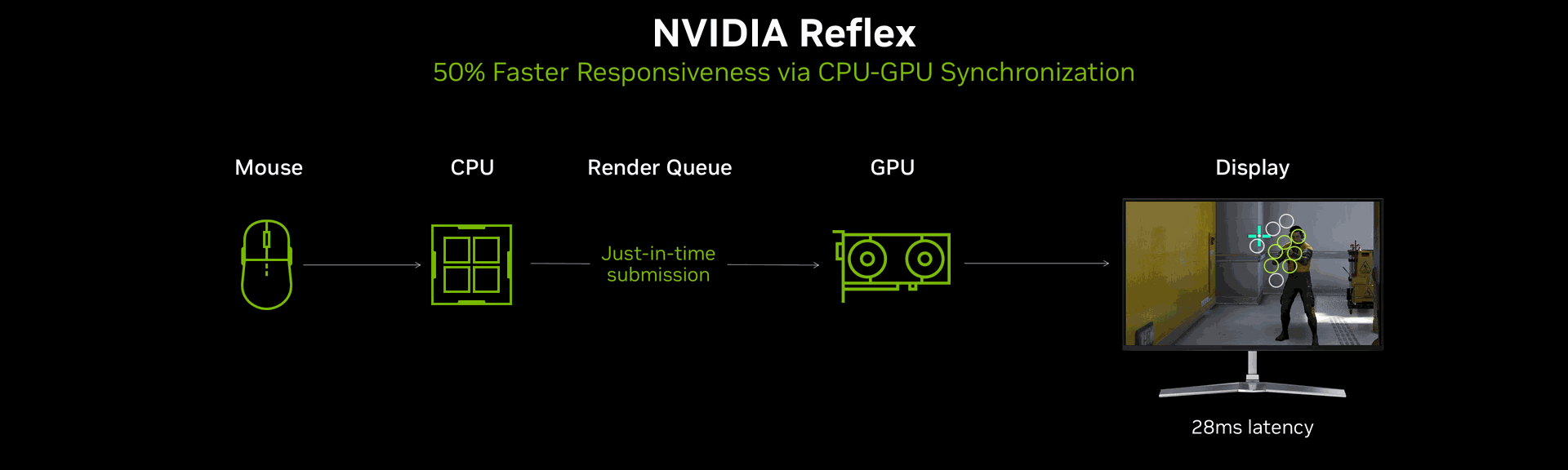
Blackwell introduces NVIDIA Reflex 2, which combines Reflex Low Latency mode—synchronising the CPU and GPU to reduce delays—with a brand-new technology called Frame Warp Technology. This adjusts, in real time, the images being displayed based on the most recent mouse movements, just before the image is sent to the screen.
Together, these innovations reduce latency by up to 75%, drastically improving responsiveness in competitive games.
A GPU (Graphics Processing Unit), or graphics card in English, is a specialised component for processing images and computations related to graphics. It is designed to handle complex tasks, such as rendering video games, 3D rendering, or even calculations related to artificial intelligence.
In a game, the GPU handles specific tasks:
- Graphics rendering: Drawing each frame, managing shadows, reflections, textures, and special effects such as ray tracing.
- Physics calculations: Simulating realistic movements of objects, particles, or fluids.
- Performance optimisation: Technologies like DLSS (Deep Learning Super Sampling) or shaders reduce the compute workload to display high-quality images with high FPS.
High-resolution features such as the 4K, or advanced technologies such as ray tracing, require billions of calculations per second to display smooth, detailed images. Modern GPUs, like the NVIDIA RTX 5090, are designed to meet these demands with incredible performance.
The CPU (Central Processing Unit), or central processor in French, is the computer’s brain. It is responsible for all general processing tasks and carries out the instructions of programmes. In other words, it coordinates all the computer’s operations, whether it’s managing the operating system, software, or the interactions between hardware components.
Main CPU functions:
- Data processing : It runs the calculations needed to make software, games, or applications work.
- Task management : The CPU controls coordination between components, such as communication between the GPU, the RAM (random-access memory), and peripherals.
- Sequential execution : Unlike the GPU, which processes thousands of tasks at the same time, the CPU is optimised to handle a small number of complex tasks in sequence.
The CPU plays a crucial role in:
- Managing game systems : Enemy artificial intelligence, trajectory calculations, and physics handling.
- Player-world interactions : Detecting the player’s actions (clicks, movement) and sending them to the GPU for graphical rendering.
- FPS : Although the GPU often determines visual performance, an overly slow CPU can limit the number of FPS, especially in games with lots of artificial intelligence or complex, open-world environments.
RTX Neural Shaders : artificial intelligence in the service of graphics
RTX Neural Shaders bring a key innovation by integrating AI directly into programmable shaders. This is set to revolutionise several areas, including texture compression: textures can be compressed up to 7 times while preserving their visual quality, freeing up memory for other calculations.
Neural shaders also enable cinematic-quality rendering, producing photorealistic textures, complex materials such as silk or porcelain, and realistic dynamic lighting in real time.
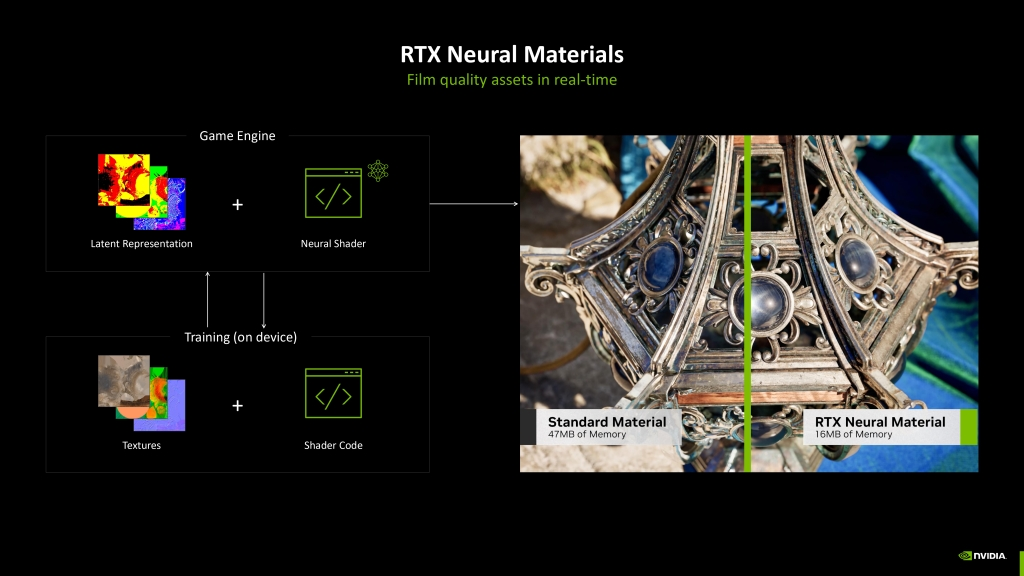
In games where environments are vast and detailed, such as Alan Wake 2, these shaders reduce memory load while increasing visual quality.
Shaders are small computer programmes used by the GPU to define how pixels, textures, and surfaces should appear on screen. They play a central role in graphical rendering by managing the appearance of objects, including their colour, brightness, shadows, or reflections.
Shaders make it possible to simulate realistic effects by calculating how light, textures, and materials interact in a scene. For example, they can render a shiny metallic object, a reflective water surface, or a worn, detailed wall. They are essential for producing immersive, convincing images.
Shaders also allow raw geometric shapes to be transformed into immersive, realistic environments.
In modern games, such as those using ray tracing, shaders play a central role in handling lighting effects and complex materials.
For example, the RTX Neural Shaders introduced with the RTX 5000 use AI to go even further, enabling texture compression or the simulation of cinematic effects with increased precision.
Neural Rendering : an unprecedented level of visual immersion
Neural Rendering is based on neural networks that can understand the complete composition of a scene (shadows, reflections, occlusions, etc.) and produce images that are often better than native rendering.
Unlike traditional rendering, which uses raw mathematical calculations, this method uses AI to recreate smoother images, with more accurate shadows and reflections, and better motion stability—thereby reducing artefacts such as ghosting.
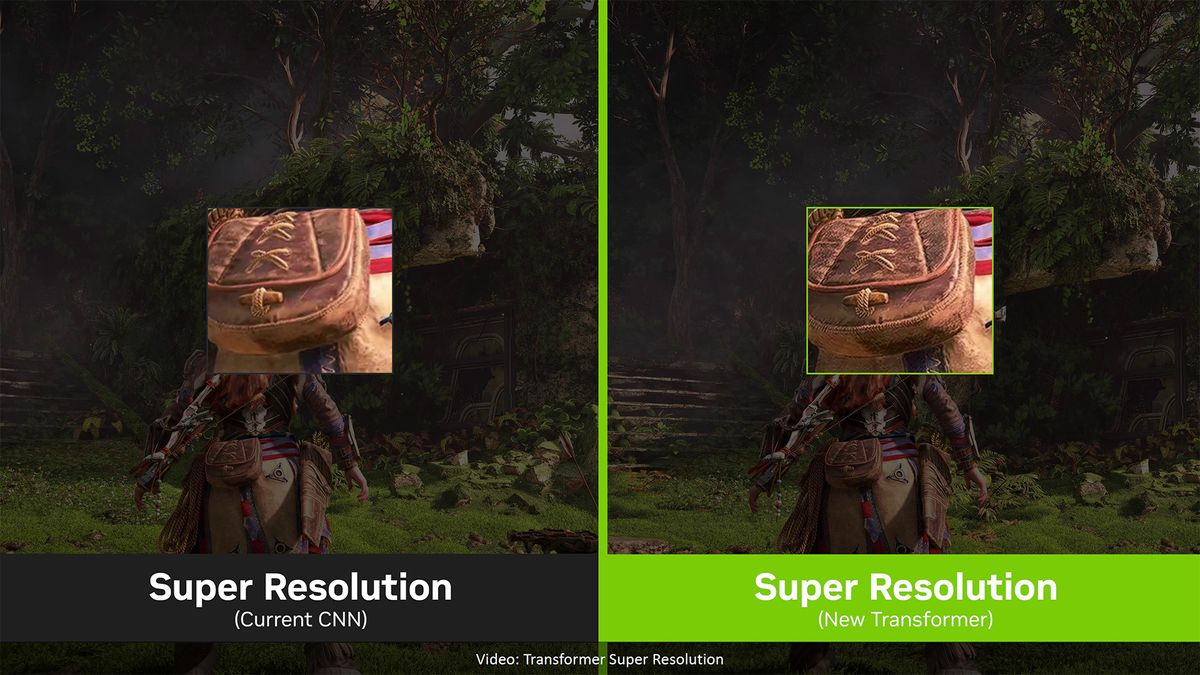
Graphics artefacts are visual anomalies or imperfections that appear on screen when a scene is rendered incorrectly by the GPU. These artefacts can show up as distorted textures, flickering, strange lines, or even abnormal transitions between images (for example, ghosting or tearing).
They harm the visual quality of an experience and can be caused by technical limitations, software bugs, or hardware that doesn’t work as expected.
The new RTX 5000 graphics cards, with their Blackwell architecture, include several technologies to reduce graphical artefacts:
- DLSS 4 with Transformer models: Improves visual stability and reduces issues such as ghosting or flickering in moving scenes.
- RTX Neural Shaders: Optimises textures and materials to prevent visual anomalies caused by excessive compression.
- Flip Metering Hardware: Enables better handling of generated images, reducing tearing and improving smoothness.
- Optimised response times: Thanks to Tensor cores and improved ray-tracing capabilities, rendering complex scenes is more precise and smoother.
Ghosting, or the phantom effect, is a visual anomaly where previous images remain partially visible behind a new image displayed on the screen. This creates a kind of trail or blur behind fast-moving objects, as if a persistent shadow lingered behind them.
It’s caused by screens that are too slow or by poor GPU–screen synchronisation. To avoid it, you need fast displays and technologies such as G-Sync.
The RTX 5000 cards, with tools such as DLSS 4, stabilise images to eliminate these trails and deliver crisp, smooth graphics.
Optimised AI-driven memory management
Thanks to RTX Neural Texture Compression, video memory (VRAM) is used far more efficiently. Compression is 7 times higher for textures, enabling you to work with much larger environments or more detailed assets without clogging up memory.
It also frees up resources for other calculations such as ray-tracing effects or the game’s AI.
Ray tracing is a graphics rendering technique that simulates the behaviour of light realistically, creating immersive reflections, shadows, and lighting.
Unlike traditional methods, it follows the path of light rays through a scene to calculate their interactions with surfaces (reflections, transparency, indirect light).
This technology delivers photorealistic graphics, but it’s extremely resource-hungry.
Modern GPUs, such as the RTX 5000, include dedicated cores to accelerate these calculations in real time. The result is a visual experience that’s markedly more immersive and realistic.
Mega Geometry and AI lighting: Even more realistic open worlds
With the arrival of Mega Geometry, RTX 5000 graphics cards take a leap forward in creating complex, detailed open worlds. This technology makes it possible to handle up to 100 times more ray-traced triangles by organising the acceleration structures needed for ray tracing more efficiently.
Triangles, which are the fundamental units of 3D objects, can now be used in massive quantities without compromising performance—ideal for vast environments such as jungles, dense cities, or post-apocalyptic set pieces.
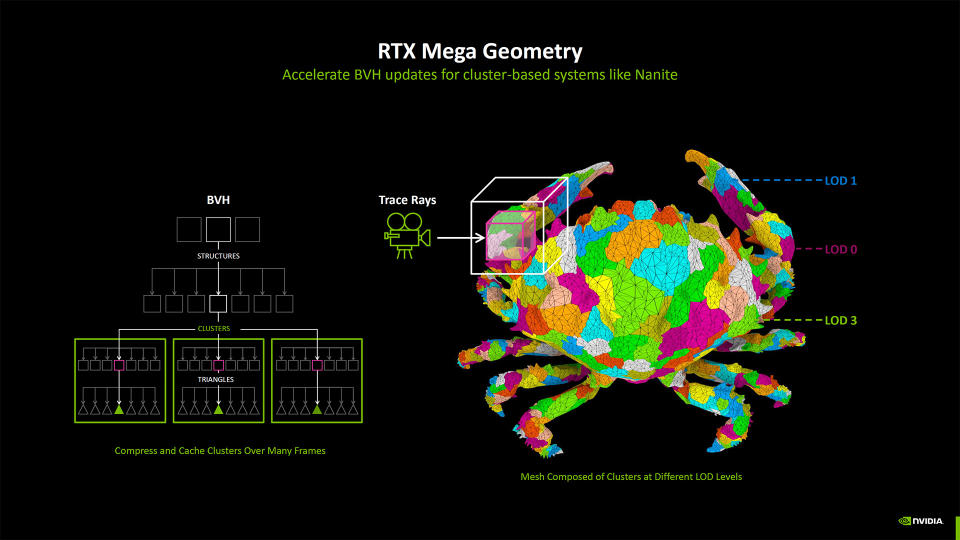
AI lighting, meanwhile, uses advanced algorithms such as RTX Dynamic Illumination and ReSTIR Path Tracing to improve the accuracy of lighting effects. Indirect light bounces are calculated more efficiently, delivering a realistic atmosphere even in very complex scenes.
For example, each light ray bounces several times off surfaces, perfectly simulating natural light interactions.
NVIDIA Broadcast: A new lease of life for production
Content creators also benefit from RTX 5000 innovations, in particular thanks to native support for H.264/H.265 in 4:2:2 video formats—an important step forward for professionals.
Unlike the standard 4:2:0 format, 4:2:2 compression preserves more colour detail while reducing file size, which is crucial for work requiring high precision, such as colour grading or HDR video editing.
The new generation of NVENC (NVIDIA encoder) significantly accelerates these processes, making encoding up to 11 times faster than with a CPU.
On the other hand, the NVIDIA Broadcast application turns any space into a professional studio. With features such as the Virtual Key Light, which simulates professional lighting to illuminate your face evenly, or Studio Voice, which improves your voice by removing background noise and correcting acoustics, Broadcast will undoubtedly become an essential tool for streamers, podcasters or videographers.

The HDR (High Dynamic Range) is a technology that improves image quality by increasing the dynamic range of colours and brightness.
Unlike SDR (Standard Dynamic Range), HDR can display deeper blacks and brighter whites, while revealing more detail in both dark and bright areas. This makes images more realistic and immersive, especially for films, video games and native HDR content.
A encoder is a hardware or software component used to transform raw data (such as uncompressed video or audio) into a compressed format optimised for storage or streaming.
For videos, it converts raw images into a compressed file (such as H.264 or H.265), while maintaining optimal visual quality with a smaller file size.
NVIDIA ACE and Project G-Assist: AI at the service of games and everyday life
NVIDIA ACE (Avatar Cloud Engine) is a suite of artificial intelligence technologies designed to transform non-player characters (NPCs). ACE enables NPCs to understand, respond to, and even interact autonomously with players, relying on generative AI models that can analyse the environment and actions in real time.
This makes virtual worlds more alive and interactive—for example, by allowing an NPC to hold a natural conversation with the player or to adapt its actions to the decisions the player makes.

With Project G-Assist, NVIDIA brings AI into PC performance. This intelligent assistant, built into the GPU, can optimise PC settings in real time: adjusting graphics for better performance, monitoring CPU and GPU usage, or even automatic overclocking.
All of this can be controlled via voice or text commands, offering simpler personalisation and management of the user experience.
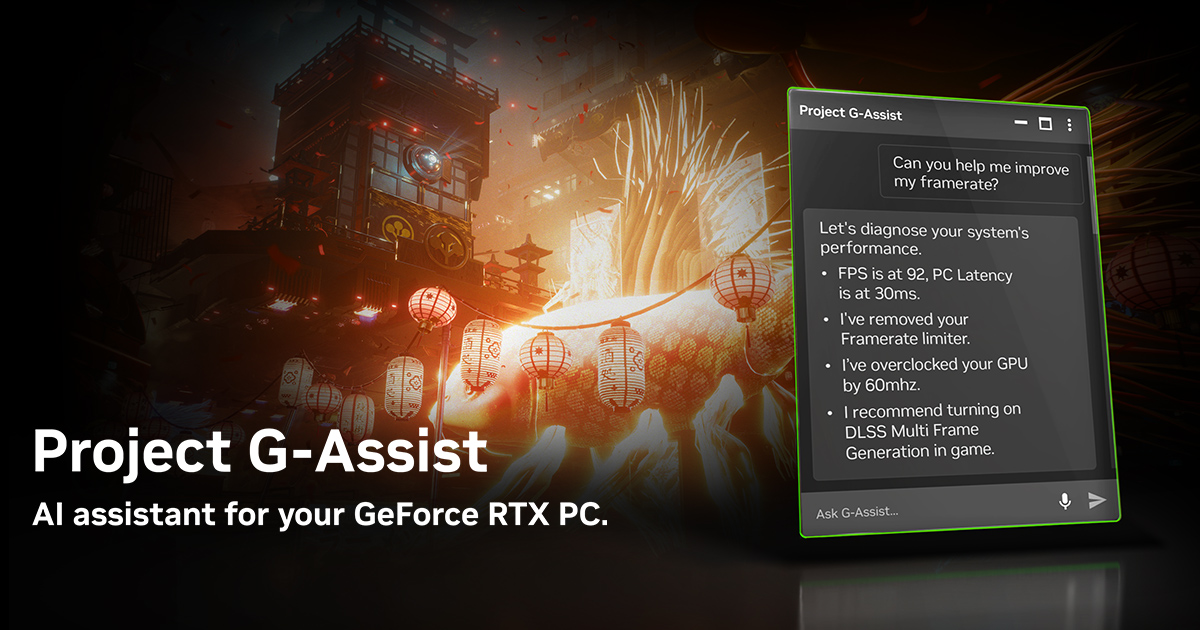
Overclocking involves increasing the operating frequency of a component, such as a CPU or a GPU, beyond its factory specifications. This can improve performance—for example, by speeding up calculations or increasing FPS in games.
However, this practice can lead to overheating and higher power consumption, requiring good cooling to avoid damaging the hardware. Overclocking is often used by enthusiasts to maximise the power of their PC.
Although effective, it must be carried out carefully to remain stable and safe.
for non-initiates
The Blackwell architecture, which equips the RTX 5000, delivers spectacular graphics performance thanks to the integration of artificial intelligence:
- Increased smoothness: DLSS 4 can multiply FPS by 8, making games ultra-smooth even in 4K with ray tracing.
- Exceptional responsiveness: NVIDIA Reflex 2 reduces latency by 75%, ideal for competitive games.
- Realistic graphics: Neural shaders and AI rendering produce sharper, more immersive images, with optimised memory management.
In short, Blackwell marks the start of a new era in which graphics are no longer just pixels, but intelligent creations—optimised by AI.
Should we move on to DLSS 4 next? 😊
