 Your PC in instalments (up to 12x)
Understanding what computers are
In a world where technology seeps into every aspect of our everyday lives, understanding how a computer works is no longer just the preserve of tech enthusiasts. Similar to a technology-focused science lesson, this article invites you to explore the hidden mysteries behind the metal casing of a desktop computer.
Unlike a biological dissection, where we examine an organism’s internal organs, our journey will focus on the careful dismantling and the study of each component that powers this complex and essential machine of our digital age.
Our goal is not only to name these components, but to demystify how they work, to understand how they fit together to bring a computer to life, and to grasp the importance of each piece in the overall puzzle.
Whether you’re a curious student, a professional looking to deepen your knowledge, or simply a technology enthusiast, this exploration is designed to make the often intimidating world of computer hardware accessible.
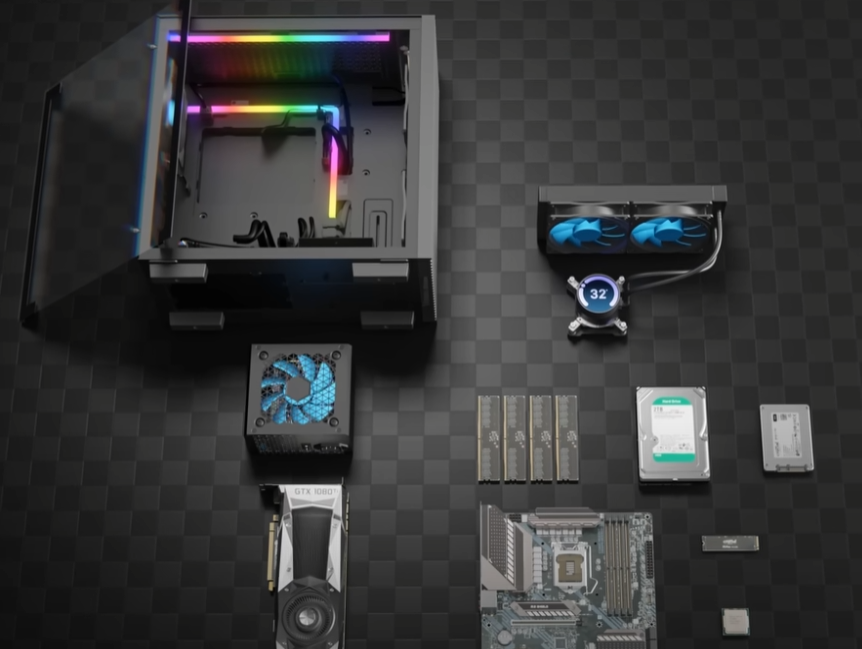
The Heart of the Computer: The CPU
At the heart of every desktop computer beats a vital component: the Central Processing Unit (CPU), often referred to as the computer’s brain. This key piece coordinates most of the essential operations that allow the computer to function, from executing programmes to managing the user’s commands.
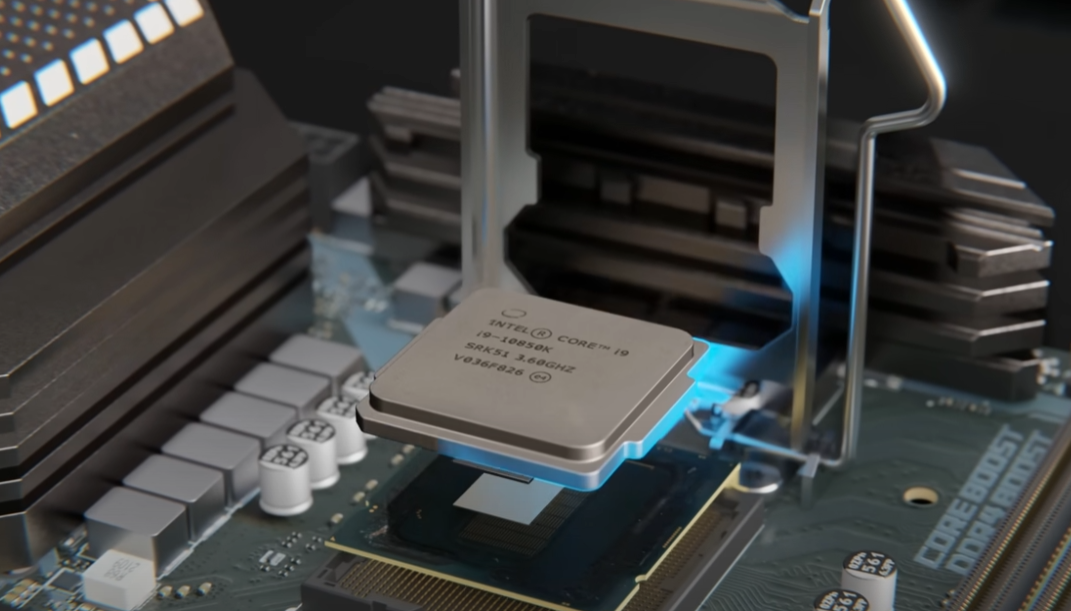
In this section, we’ll explore the CPU’s structure and function to demystify its central role in the computer system.
CPU Structure
The CPU is a complex assembly of elements integrated into a small square of silicon. On its upper surface, you’ll find the integrated heat spreader (IHS), a metal plate designed to dissipate the heat generated by the processor. Beneath the IHS is the die, the silicon core of the CPU, where billions of transistors work in concert to execute computer instructions. The die is mounted on a substrate that acts as a support, making it easier to connect electrically to the rest of the computer via the motherboard.
Operation and Architecture
The CPU is divided into several cores, each capable of executing instructions simultaneously. This multi-core architecture increases the computer’s processing power, enabling multiple tasks to be carried out in parallel. Each core contains elements such as arithmetic logic units (ALUs), registers, and a small amount of cache memory—each designed to optimise the processing of data and instructions.
Transistors: The Builders of Logic
Inside the die, transistors play a fundamental role. These tiny electronic switches can be turned on or off, allowing the representation of the binary states 0 and 1, which form the basis of all computer logic. With between 8 and 10 billion transistors in a modern CPU, the computer’s computing and processing capability is astonishing.
Interconnection and Communication
The CPU communicates with the other components of the computer through a complex network of buses and built-in controllers. The connection points, or pads, on the die connect to the motherboard socket, enabling the CPU to receive data from memory, send instructions to the GPU, and manage input/output with peripherals.
Other Key Components of the CPU
Even though it is the computer’s brain, the CPU doesn’t work in isolation. It is part of a larger set of interconnected components, each playing a crucial role in the machine’s overall performance.
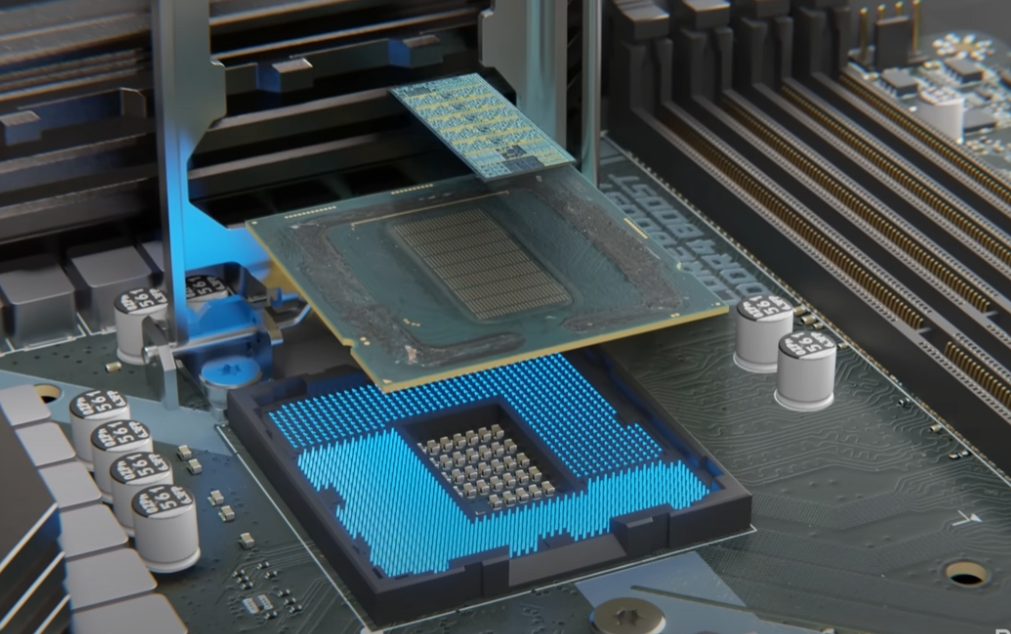
L3 Cache Memory and Ring Interconnect
L3 cache memory, shared between the CPU cores, is essential for speeding up access to frequently used data. By temporarily storing this information, the CPU can retrieve it quickly, reducing the waiting time associated with fetching data from main memory (RAM). The ring interconnect enables smooth communication between the cores, cache memory, and other CPU components, thereby optimising the processing of instructions and data.
Integrated Graphics Processor (iGPU)
Alongside traditional computing features, many modern CPUs include a graphics processor (iGPU). Although less powerful than a dedicated GPU, the iGPU is still capable of handling basic graphics tasks, such as video playback and displaying the user interface. For users who don’t carry out graphically intensive tasks, the iGPU provides a cost-effective, energy-efficient solution for their everyday computing needs.
Memory Controller
The memory controller acts as the link between the computer’s CPU and its main memory (RAM). It manages the flow of data between these two components, ensuring that the CPU has fast access to the programmes and data needed to carry out tasks. By integrating the memory controller directly into the CPU, manufacturers have significantly reduced latency, thereby improving the overall performance of the computer.
System Agent and I/O Platform
The system agent plays a key role in managing communication between the CPU and the rest of the computer. It coordinates the flow of data to and from components such as the chipset, input/output (I/O) devices, and network interfaces. This efficient handling of data is essential for the smooth operation of the computer, ensuring that resources are allocated optimally for the tasks in progress.
Motherboard: The Connection Hub
The motherboard is the central pivot around which the entire architecture of a desktop computer is built. It acts as a major junction, linking the CPU to the various components and peripherals needed for the computer to run smoothly.
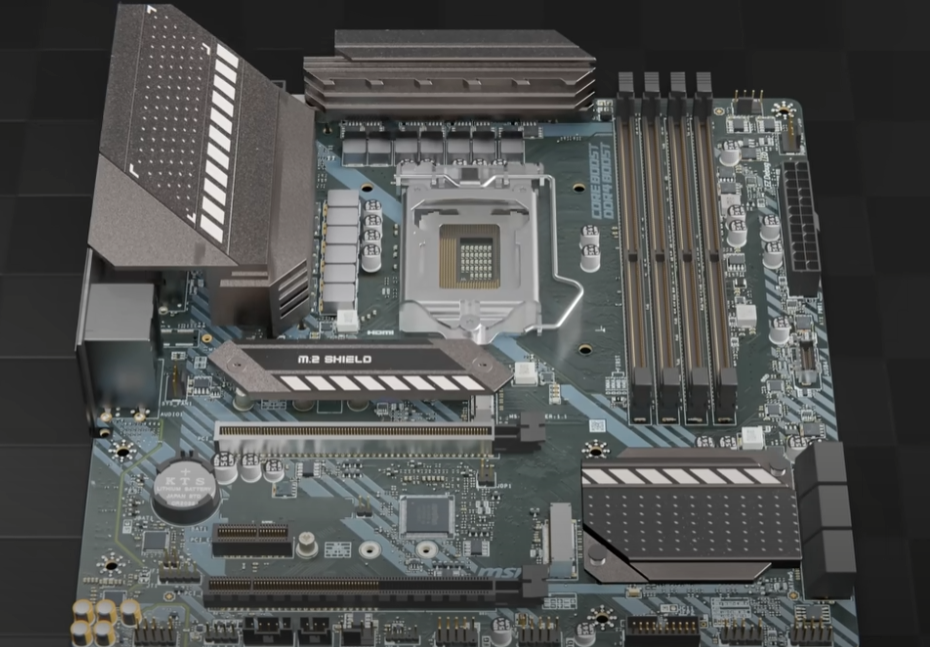
It is on it that components as varied as the system memory (RAM), expansion cards, storage drives, and, of course, the processor are placed and communicate.
Structure and Composition
The motherboard is a large printed circuit board with multiple layers that house electrical tracks, connectors, and a variety of microchips. Its design is an engineering achievement in electronics, intended to maximise compatibility and performance while minimising interference and signal delays. Every slot, slot position, and port on the motherboard is carefully planned to make it easier to install components and ensure ventilation.
The Chipset: The Motherboard’s Brain
The chipset is a set of integrated circuits that plays a crucial role in managing data between the CPU, memory, expansion cards, and other peripherals. It determines which features are available on the motherboard, including support for certain memory speeds, the number of USB ports, and network connectivity options. In short, the chipset defines the capabilities of the motherboard and, by extension, the entire computer.
Connectors and Expansion Slots
The motherboard provides a range of connectors and expansion slots to expand the computer’s capabilities. PCI Express (PCIe) slots allow the addition of graphics cards, sound cards, and network cards, while DIMM slots house the RAM. Other connectors, such as SATA for hard drives and SSDs, as well as USB ports for external peripherals, are also included.
The Role of Connectors and Ports
In addition to expansion slots, the motherboard includes a whole host of ports to connect the computer to external devices. These ports include audio input/output, Ethernet ports for network connections, USB ports of different generations for peripherals, and sometimes integrated video ports for displays. The variety and number of these ports ensure a high degree of flexibility in how the computer is configured and used.
The Cooling and Power System
For a desktop computer to run efficiently and safely, it must be equipped with an appropriate cooling system and a reliable power supply. Both of these elements are crucial for maintaining performance and extending the lifespan of the internal components.
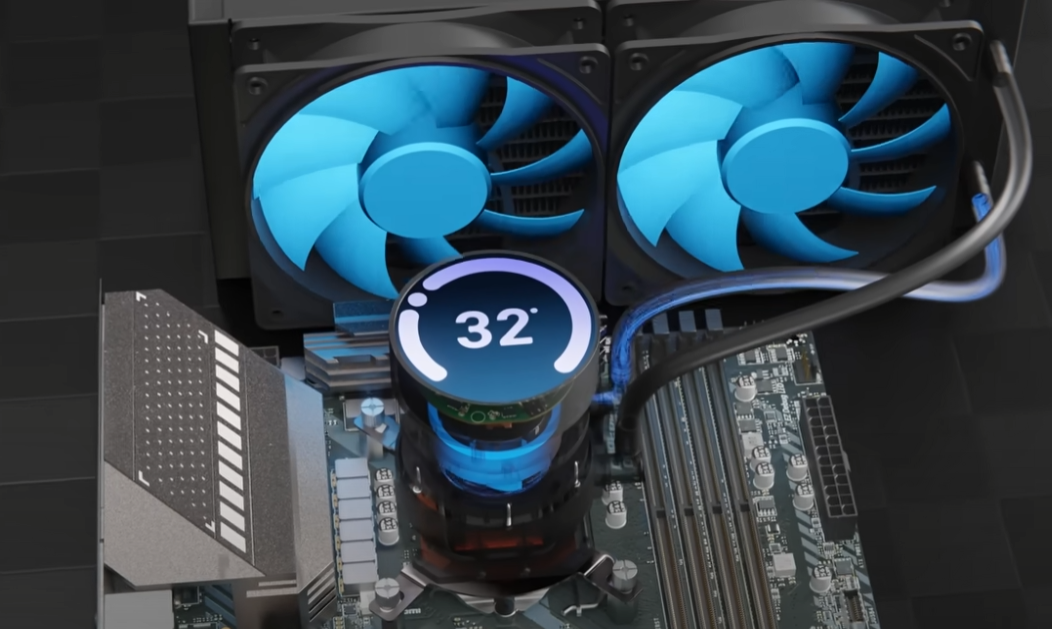
In this section, we’ll explore how cooling and power play a fundamental role in how a computer works.
The Cooling System
Heat generation is an unavoidable consequence of electronic component operation, particularly the CPU and GPU. Without adequate cooling, the temperature can rise to the point where it causes irreversible damage or significantly reduces performance.
- Air Cooling: The most common solution involves fans and heat sinks. The heat sink draws heat out of the component (such as the CPU), and the fans disperse it throughout the case and to the outside.
- Liquid Cooling : For higher performance, some systems use liquid cooling. A coolant circulates through a closed circuit, passing through a cooling block attached to the CPU to absorb the heat, before being cooled in a radiator.
Power Supply Unit
The power supply unit (PSU) is responsible for providing stable, clean electrical power to all the components of the computer. It converts the alternating current (AC) from the mains into direct current (DC) that can be used by the computer, while regulating the voltage to prevent overloads.
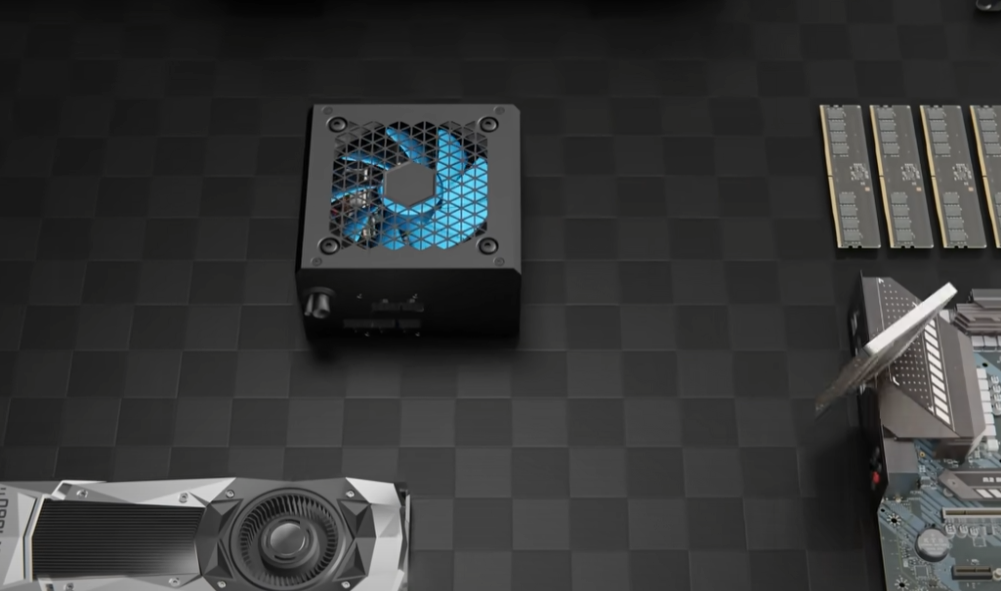
- Power and Efficiency: PSUs are classified by wattage to indicate their maximum energy supply capacity. Efficiency certifications (such as 80 Plus) provide assurance that the unit operates with minimal energy waste.
- Component Protection : In addition to supplying power, quality PSUs include protections against overvoltage, undervoltage, short circuits, and overheating, thereby ensuring the safety of valuable computer components.
The Graphics Processor (GPU)
The graphics processor, or GPU (Graphics Processing Unit), is an essential component in the architecture of a modern computer—especially for tasks that require intensive graphics processing such as video games, 3D modelling, and video processing.
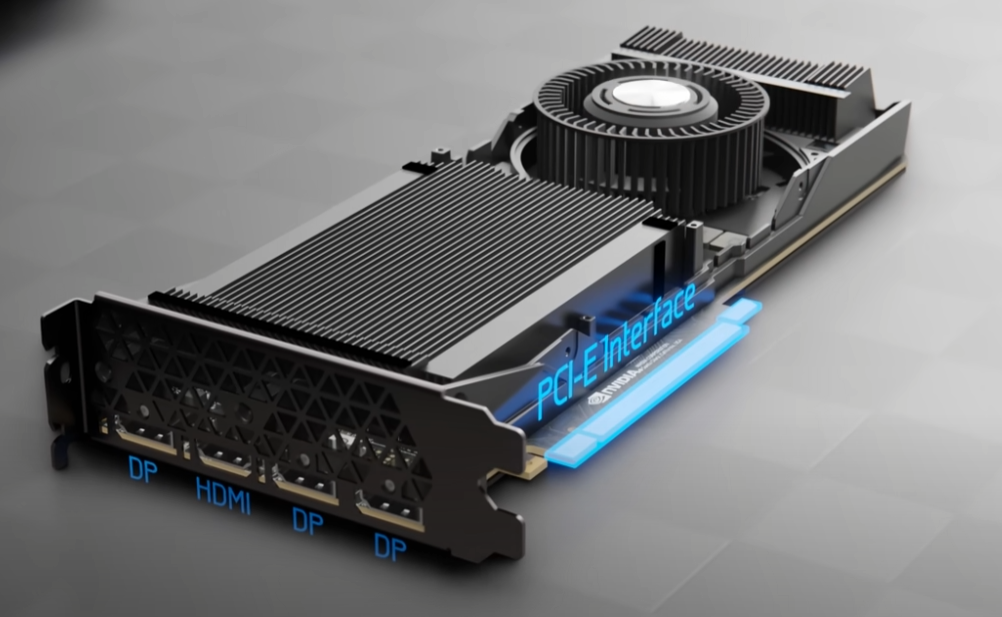
While the CPU is designed to handle a wide range of computing tasks, the GPU is specialised in the fast rendering of images and videos, carrying out large-scale parallel calculations.
GPU Architecture
Unlike a CPU, a GPU consists of hundreds, even thousands, of smaller processing cores designed to carry out many tasks simultaneously. This ability to manage a large number of calculations in parallel makes GPUs incredibly efficient for graphical rendering and for scientific or engineering calculations that can be parallelised.
Role and Applications
- Graphical Rendering : The GPU accelerates the creation of images by quickly manipulating and calculating graphical data, significantly improving the quality and smoothness of animations and videos.
- Scientific Computing and Artificial Intelligence : Thanks to their ability to perform parallel calculations, GPUs are also used in scientific research and artificial intelligence, where they can significantly speed up data processing.
Integrated GPU vs. Dedicated GPU
- Integrated GPU : Often built into the CPU, the integrated GPU shares resources such as RAM with the rest of the system. Although it’s less powerful than a dedicated GPU, it’s sufficient for everyday tasks and light gaming.
- Dedicated GPU : A dedicated GPU is a separate card with its own RAM (VRAM) and its own processing resources, delivering significantly higher performance for graphics rendering and demanding tasks.
Impact on Performance
Adding or upgrading a GPU can transform the computing experience, enabling smoother games, shorter rendering times for content creation, and an overall improvement in responsiveness in visually demanding applications.
Peripherals: Mouse and Keyboard
Peripherals such as the mouse and keyboard are the main ways the user interacts with the computer, turning intentions into actions within the system.
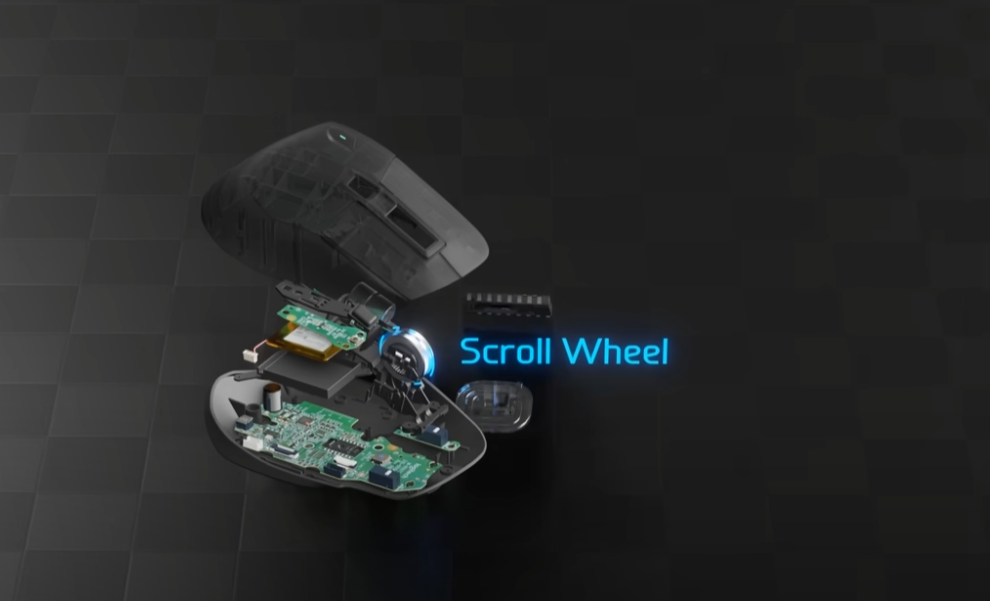
Despite their simple appearance, these devices conceal advanced technology and detailed engineering that allows smooth and precise communication.
The Mouse: More Than a Simple Pointer
- Technology : Modern mice mainly use optical or laser sensors to track movement across a variety of surfaces. These sensors capture thousands of images per second to determine the direction and speed of movement, enabling precise cursor control on the screen.
- Evolution: Moving from mechanical balls to optical sensors, mouse technology has evolved significantly, offering today improved precision and ergonomics to suit a wide range of uses, from office tasks to intense gaming.
The Keyboard: An Essential Input Interface
- Mechanisms: Keyboards can be classified according to their key-switch mechanism, such as membranes, rubber domes, or mechanical switches. Each type provides a distinct typing experience, affecting speed, comfort, and durability.
- Customisation: Mechanical keyboards, in particular, allow for extensive customisation thanks to a variety of switches (linear, tactile, clicky) and keycaps, giving users the ability to adjust the feel of their typing to suit their preferences.
Role in Ergonomics and User Experience
The ergonomics of mice and keyboards are crucial for preventing fatigue and associated musculoskeletal disorders linked to prolonged use. Ergonomic designs, such as vertical mice or split keyboards, aim to keep hands and wrists in a natural position, reducing the risk of injury.
Importance in Gaming and Productivity
In the world of gaming, peripherals are specially designed to give players a competitive edge through increased precision, fast response times, and extra features such as macro programming. Similarly, for productivity, keyboards with dedicated shortcuts and multi-button mice can improve efficiency in complex computer tasks.
Conclusion: The Symphony of Computer Technology
At the end of our exploration of the fundamental components of a desktop computer, it becomes clear that every element, from the CPU to the mouse, plays a crucial role in coordinating a smooth, high-performance computing experience. This dive into a computer’s anatomy reveals not only the complexity and precision required for these machines to work, but also the human ingenuity behind every design and technological innovation.
Advances made in each component—whether it’s the computing power of the CPU and GPU, the speed and storage capacity of SSDs and hard drives, or the efficiency of cooling and power systems—reflect a constant commitment to improvement and optimisation. Likewise, peripherals such as the mouse and keyboard show that attention to detail and ergonomics can turn everyday interactions into enriching and comfortable experiences.
Understanding how the internal workings and the interactions between the different components of a computer work allows us to fully appreciate the technology that shapes our modern world. It also encourages us to be more informed users, capable of making well-informed choices about our IT hardware, whether for productivity needs, leisure, or creativity.
In conclusion, the desktop computer, far from being just a black box, is a symphony of technology, where each component contributes to the power, flexibility, and efficiency of the whole system. As users, we play the role of conductors, orchestrating these technologies to bring our creative visions to life, solve complex problems, and explore new digital frontiers.
