Your PC in instalments (up to 12x)
📥 Install games faster on your PC: the best tips 🚀
Installing a game on a PC can sometimes seem to take forever, especially when it weighs several dozen (or even hundreds) of gigabytes. Fortunately, there are several tips to speed up PC game installations and optimise game downloads on Steam, Epic Games or Battle.net.
In this article, we’ll look at how to download games faster, optimise your hard drive or SSD, and use the best gaming PC configurations for quick installs.
🛜 1. Boost the download speed of PC games
Video game downloads are often the longest part.
To increase the download speed of games, here are the best practices:
📌 Optimise your internet connection
- Use an Ethernet cable instead of Wi‑Fi: A wired network is more stable and reduces connection drop-outs.
- Close background applications: Turn off Netflix, YouTube, or torrents to boost the PC game installation speed.
- Change server on Steam: In Steam > Settings > Downloads, choose a less congested server to download games faster.
⚡ Unfetter your internet connection
- Restart your router to avoid bandwidth loss.
- Try a VPN if your ISP limits the download speed of games.
- Switch to fibre if you’re still on ADSL or VDSL.
💾 2. Install a game quickly on an SSD instead of an HDD
Choosing the storage medium is crucial (not necessarily the brand😉) to speed up game installation on a PC. A fast gaming SSD is essential:
🔹 SATA SSD: Up to 5 times faster than a standard HDD.
🔹 NVMe SSD: 10 times faster, ideal for installing games quickly on a PC.
👉 The FlowUP gaming PCs are equipped with high-performance NVMe SSDs only, ensuring ultra-fast installation speeds and optimised load times.
OUR GAMING PCS
🏗 3. Defragment your hard drive to speed up game installation
If you’re still using a HDD for games, file fragmentation can slow down the process.
On Windows:
- Type Defragment and optimise drives in the search bar.
- Select your HDD hard drive and click Optimise.
💡 Never defragment an SSD—it reduces its lifespan without improving speed.
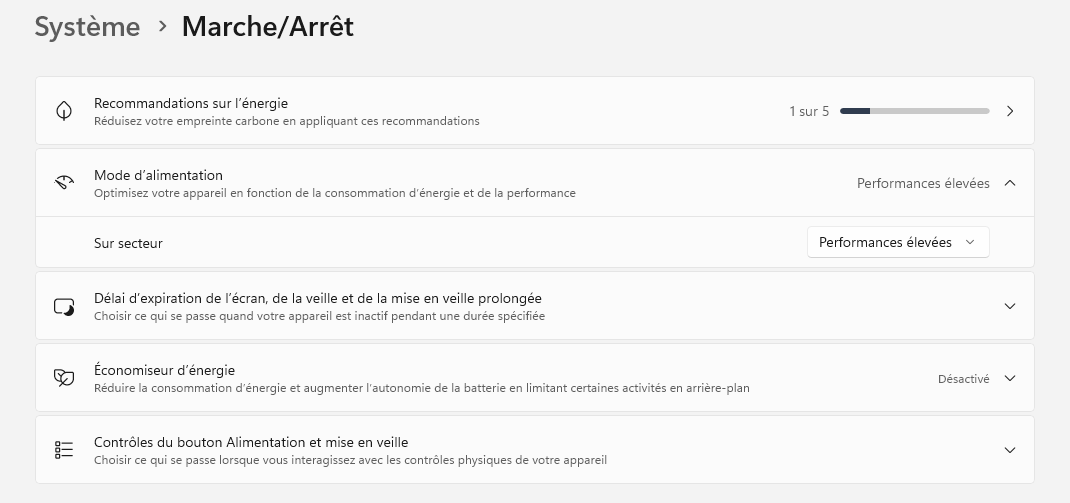
🚀 4. Enable Windows performance mode to install games faster
During installation, some unnecessary tasks can slow down your PC.
- Close resource-hungry apps via the task manager (Ctrl + Shift + Esc).
- Temporarily disable antivirus that scans every downloaded file.
- Enable high performance mode in Control Panel > Power Options.
🔥 5. Check your SSD’s write speed to optimise PC game installation
A slow or full SSD can slow down game installation.
- Check your free space (This PC > Properties of the drive).
- Test your SSD speed with CrystalDiskMark.
- Switch to a faster SSD if you’re using an aging model.
💡 Our FlowUP gaming PCs use ultra-performance SSDs, ensuring optimised installation speeds and reduced loading times.
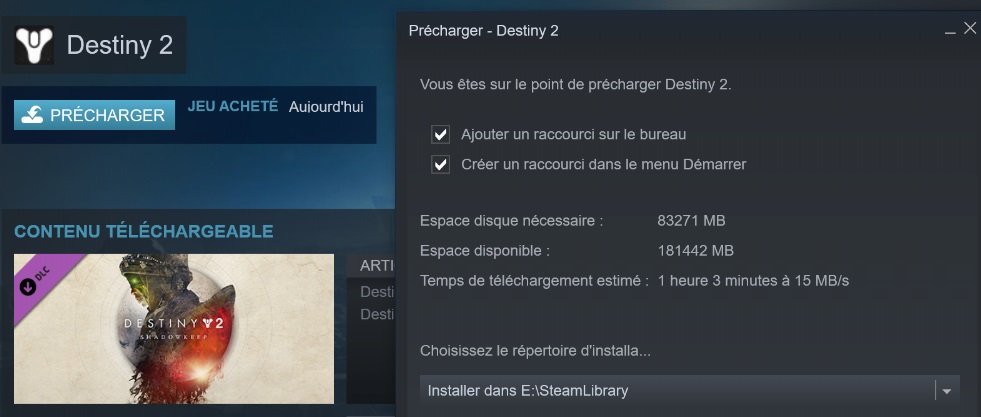
🎮 6. Preload a game before release so you can play straight away
Some platforms like Steam, Epic Games or Battle.net allow you to preload a game before it launches. This means the files are installed in advance, so you can start playing as soon as the servers open.
How do I enable preloading?
- Go to the game page in your library.
- Click “Preload” if the option is available.
- On release day, a simple patch will be applied and the game will be ready immediately.
🛠 7. Use a secondary drive to avoid saturating your SSD
If your main SSD is full, it can slow down the speed of game installations.
Solution: Install your games on a second SSD or a fast external drive so you don’t bottleneck the performance of your gaming PC.
🚀 8. Enable Steam caching to download games faster
Steam offers an option to optimise the download speed of PC games.
📌 How do I enable it?
- Go to Steam > Settings > Downloads.
- Tick “Allow download caching”.
This speeds up installation by temporarily storing files so you don’t have to redownload them.
🚀 In short: How to install a game faster on PC?
👉 To optimise game installation and reduce download times:
✅ Use a fast SSD (NVMe recommended).
✅ Optimise your internet connection (Ethernet + fast server).
✅ Close unnecessary software and enable the Windows performance mode.
✅ Preload your games when possible.
✅ Optimise your hard drive (defragmentation for HDD, cleaning for SSD).
With these best tips to install a game quickly, you’ll spend less time waiting… and more time playing! 🎮🔥
💻 FlowUP: gaming PCs optimised to download games faster 🚀
If you’re looking for a fast, high-performance gaming PC, discover FlowUP configurations:
✅ Ultra-fast NVMe SSDs for near-instant installs.
✅ High-end components (not green RAM or low-end stock coolers).
✅ Total transparency about configurations, no nasty surprises.
Play faster, install faster: switch to a FlowUP-optimised PC! 🚀