
By the FlowUP team, gaming PC builder in Genappe (Belgium) · Updated 23 November 2026
In brief: Ghost of Tsushima on PC runs brilliantly: it’s one of the best PlayStation ports, with no stuttering. Count on an RTX 2060 for 1080p/60, an RTX 3070 for 1440p, an RTX 4080 for 4K/60, 16 GB of RAM and 75 GB on an SSD. Our pick: the Gamora PC (Ryzen 7 7800X3D, RTX 5070 Ti 16 GB, 2 TB SSD).
A field of tall grass battered by the wind, a sabre, and an entire island to liberate. Ghost of Tsushima, released on PC on 16 May 2024, is one of the most polished ports ever to come out of a PlayStation studio.
It’s the work of the Nixxes studio, and you can feel it: no shader compilation screen, no stuttering during loading, clean DLSS and FSR. The result is that Ghost of Tsushima on PC runs far more smoothly than most big games from 2025. Here’s what Sony asks for, what the benchmarks show, and the PCs we build in Genappe to play it.
Ghost of Tsushima PC system requirements: what Sony asks for
Sony has published four tiers, from 720p to 4K. Each assumes upscaling enabled (DLSS, FSR or XeSS). The game requires 75 GB on an SSD and 16 GB of RAM starting from the recommended tier.
| Tier | Resolution / FPS | Graphics card | Processor | RAM |
|---|---|---|---|---|
| Minimum | 720p / 30 FPS | GTX 960 or RX 5500 XT | Core i3-7100 or Ryzen 3 1200 | 8 GB |
| Recommended | 1080p / 60 FPS | RTX 2060 or RX 5600 XT | Core i5-8600 or Ryzen 5 3600 | 16 GB |
| High | 1440p / 60 FPS | RTX 3070 or RX 6800 | Core i5-11400 or Ryzen 5 5600 | 16 GB |
| Ultra | 4K / 60 FPS | RTX 4080 or RX 7900 XT | Core i5-11400 or Ryzen 5 5600 | 16 GB |
Source: official configuration relayed by PCGamesN. Windows 10 or 11 and 75 GB on an SSD for all tiers.
- SSD, yes; hard drive, no. Sony ticks “SSD” starting from the recommended tier. Count on 75 GB free on an SSD.
- The processor stays reasonable. Even in 4K, Sony stops at a Core i5-11400 or a Ryzen 5 5600. In this game, it’s the graphics card that does the bulk of the work.
- 8 GB RAM minimum, 16 GB everywhere else. That’s the amount we put into our PCs starting from the entry-level range.
Which graphics card for Ghost of Tsushima at 1080p, 1440p and 4K?
Sony’s tier list is straightforward, because the game scales smoothly with graphics power.
- 1080p / 60: an RTX 2060 or an RX 5600 XT is enough. On 2025 cards, that’s a given, no problem at all.
- 1440p / 60: Sony asks for an RTX 3070 or an RX 6800. A RTX 5070 goes well beyond that.
- 4K / 60: this is where the game gets demanding. Sony demands an RTX 4080 or an RX 7900 XT. A RTX 5080 handles this role with plenty of headroom.
To choose a graphics card for your screen, our guide how to choose your graphics card sorts out what you need between 1080p, 1440p and 4K.
A polished port: DLSS, FSR and no stuttering
This is the real selling point of Ghost of Tsushima on PC. Nixxes delivered a complete, stable port.
- All upscalers are included: DLSS 3 with image generation, FSR 3 and XeSS, plus DLAA for those who want the best native image.
- No shader compilation stutters. The game doesn’t force you to sit through a waiting screen at launch and it doesn’t micro-stutter while exploring, where so many recent games struggle.
- Well-equipped PC: ultrawide monitors, NVIDIA Reflex, fine-tuned settings. A real port, not just a simple copy-paste of the console version.
Ghost of Tsushima doesn’t use ray tracing: it’s a game originally designed for the PS4. So you get a lot of extra FPS without that overhead.
Video memory: how many GB for Ghost of Tsushima?
- 8 GB are enough for 1080p and 1440p on High, with upscaling enabled.
- 12 GB put you comfortably in 1440p with textures on maximum.
- 16 GB are the right choice for 4K and the heaviest textures.
The details are in our guide 8, 12 or 16 GB of VRAM. And since the game likes RAM, our PCs go to 32 GB from the mid-range onward: our guide 16 GB or 32 GB of RAM explains why.
Settings that help you gain FPS
- DLSS on Quality on a GeForce: the image stays sharp and you gain a whole bunch of FPS.
- Image generation helps as soon as you’re above 50 to 60 FPS, handy if you want to enjoy a 144 Hz display.
- Shadows and the draw distance are expensive on this huge island: lower them by one step before touching anything else.
- The NVMe SSD avoids loading times. Our guide for choosing your SSD helps you find the right capacity.
Our PCs for Ghost of Tsushima: which one should you choose?
Three builds, from comfortable 1440p to 4K. All are assembled, cabled and tested in Genappe, and ship with Windows 11.
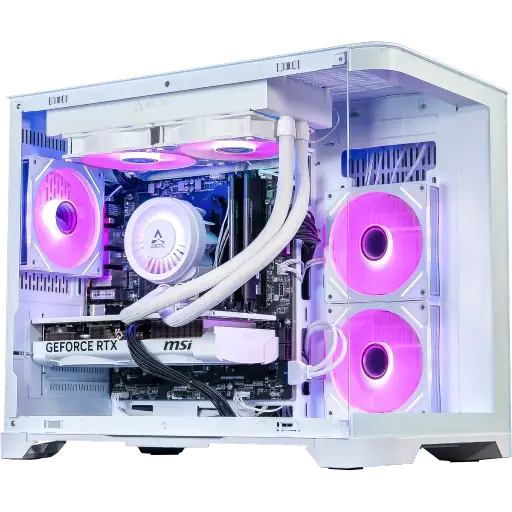
Eclipsia PC GeForce RTX 5070
Ryzen 7 5700X, RTX 5070 12GB, 32GB DDR4, 1TB SSD, 240mm watercooling, white design. For 1440p on high without effort: an RTX 5070 sits well above the RTX 3070 Sony requested at this level.
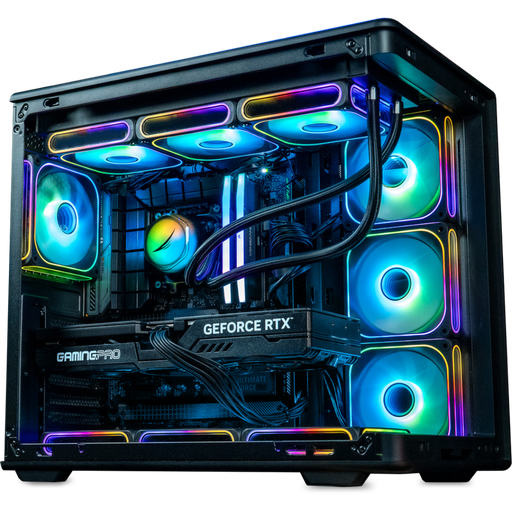
Gamora PC GeForce RTX 5070 Ti 16GB
Ryzen 7 7800X3D, RTX 5070 Ti 16GB, 32GB DDR5, 2TB SSD, MSI B850 motherboard. Our choice for Ghost of Tsushima: 1440p on ultra, 4K within reach with DLSS, 16GB of video memory and 2TB to install the game without counting.
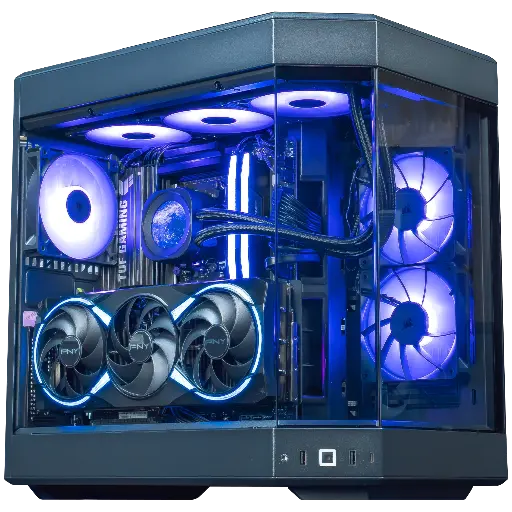
Orion PC GeForce RTX 5080
Ryzen 7 9800X3D, RTX 5080 16GB, 32GB DDR5, Samsung 990 EVO Plus 1TB SSD, 360mm watercooling, 1000W 80 Plus Gold power supply. For 4K/60: it’s Sony’s “RTX 4080” tier, with a newer graphics card. It’s part of our Top Player selection for Black Friday.
Test of the Orion RTX 5080 PC on the FlowUP YouTube channel.
Workshop review
- For 1440p on high: the Eclipsia PC.
- For 1440p maxed out and 4K with DLSS: the Gamora PC, our choice.
- For 4K/60 without compromises: the Orion PC.
- More than 50,000 PCs sent out from Genappe: if you’re torn between two configurations, the team gets back to you before you buy.
Also to read: two other successful PlayStation ports with Stellar Blade on PC and Spider-Man 2 on PC, and a demanding open world with Assassin’s Creed Shadows on PC.
Another recent game to tame: our build for Monster Hunter Wilds on PC.
A lighter port to catch your breath: our build for S.T.A.L.K.E.R. 2 on PC.
FAQ Ghost of Tsushima PC
What is the minimum configuration for Ghost of Tsushima on PC?
A GTX 960 or an RX 5500 XT, a Core i3-7100 or a Ryzen 3 1200, 8GB of RAM and 75GB on an SSD. This minimum targets 720p at 30 FPS with upscaling.
Which graphics card for Ghost of Tsushima at 1440p?
Sony asks for an RTX 3070 or an RX 6800 for 1440p/60. An RTX 5070 is well above that and leaves plenty of headroom for maximum textures.
What card do you need to play in 4K?
For 4K/60, Sony requires an RTX 4080 or an RX 7900 XT. An RTX 5080 handles this comfortably, especially with DLSS on Quality.
Does Ghost of Tsushima have stutters on PC?
No. The Nixxes port doesn’t compile the shaders at launch and doesn’t micro-stutter in-game, making it one of the cleanest PlayStation ports.
How much does Ghost of Tsushima weigh on PC?
75GB, to be installed on an SSD. An NVMe SSD prevents long loading times on such a large island.
Sources
- PCGamesN, Ghost of Tsushima system requirements
- PC Gamer, Ghost of Tsushima PC performance review
- TweakTown, Ghost of Tsushima Director’s Cut PC specs (RTX 4080 for 4K/60)
