
By the FlowUP team, gaming PC builder in Genappe (Belgium) · Updated 23 November 2026
In short: Monster Hunter Wilds runs on Capcom’s RE Engine and heavily taxes the processor. Plan for at least a GTX 1660 and 16 GB RAM, an RTX 2060 Super to aim for 1080p/60 with image generation, and 75 GB on an SSD. Our choice: the Gamora PC (Ryzen 7 7800X3D, RTX 5070 Ti 16 GB).
A plain swept by a sandstorm, a monster as big as a building, and a hunt that never ends. Monster Hunter Wilds, released on 28 February 2025, is one of Capcom’s most ambitious games, and one of the most demanding on a PC.
Its engine, the RE Engine, shows an immense, living world, at the cost of a heavy processor load. Monster Hunter Wilds on PC got people talking at launch, but with the right configuration you can tame it. Here’s what Capcom asks for, what the benchmarks show, and the PCs we build in Genappe so you can play it.
Monster Hunter Wilds PC system requirements: what Capcom asks for
Capcom published two tiers. The detail that surprised everyone: from the recommended tier onwards, Capcom counts on image generation to reach 60 FPS.
| Tier | Resolution / FPS | Graphics card | Processor | RAM |
|---|---|---|---|---|
| Minimum | 720p / 30 FPS (Low, Quality upscaling) | GTX 1660 or RX 5500 XT (8 GB) | Core i5-10400, i3-12100 or Ryzen 5 3600 | 16 GB |
| Recommended | 1080p / 60 FPS (Medium, image generation) | RTX 2060 Super or RX 6600 (8 GB) | Core i5-10400, i3-12100 or Ryzen 5 3600 | 16 GB |
Source: Capcom’s official specs relayed by PCGamesN. 16 GB RAM, an SSD and 75 GB of storage space for all tiers.
- An SSD is mandatory. The game weighs about 75 GB (it had been reduced to that size after updates, compared to the 140 GB announced at launch), with an optional high-resolution texture pack of about 19 GB.
- The processor matters as much as the graphics card. Capcom lists the same processors for both minimum and recommended, which is a sign that the RE Engine leans more on the CPU than on the GPU.
- 8 GB of video memory on both tiers. That’s fair: with heavy textures, a card with 12 to 16 GB breathes a lot more easily.
Why Monster Hunter Wilds calls for image generation
This is the point that sparked debate. Capcom places image generation in the recommended tier, to reach 60 FPS at 1080p using the Medium preset.
- Image generation helps, but it isn’t everything. It smooths things out when you’re already around 40-50 FPS, not when the processor is brought to its knees in busy areas.
- A recent processor makes the difference. In campsites and hunts with multiple players, it’s the CPU that keeps things smooth. A Ryzen X3D, thanks to its large cache, handles these spikes much better.
- DLSS and FSR are supported and remain your best friends for getting more FPS without affecting the image too much.
To understand upscaling and image generation, our guide Spider-Man 2 on PC delves into the topic in another recent game.
Video memory and RAM: the two points to watch
- 8 GB of VRAM are enough at minimum, but they limit textures. 12 GB are the right starting point, 16 GB makes everything comfortable at 1440p. Our guide 8, 12 or 16 GB of VRAM takes stock.
- 16 GB of RAM is required, but our PCs go to 32 GB from the mid-range upward, useful when the game streams its open world. See our guide 16 GB or 32 GB RAM.
- An NVMe SSD is mandatory: our guide for choose your SSD helps you plan the 75 GB (and the texture pack).
Our PCs for Monster Hunter Wilds: which one should you choose?
Three configurations with one common point: a good processor, because it’s the one that determines smooth performance in this game. All of them are assembled, cabled and tested in Genappe.
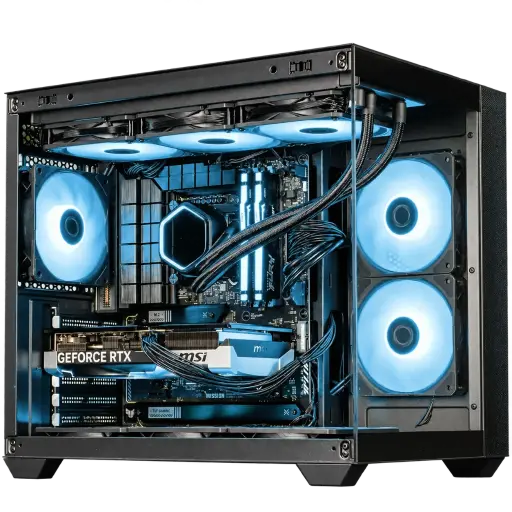
PC Aqua GeForce RTX 5070
Ryzen 5 7500X3D, RTX 5070 12 GB, 16 GB DDR5, 1 TB SSD, Cooler Master watercooling. Its X3D processor is a real advantage in a CPU-hungry game: for 1080p/60 and 1440p with upscaling.
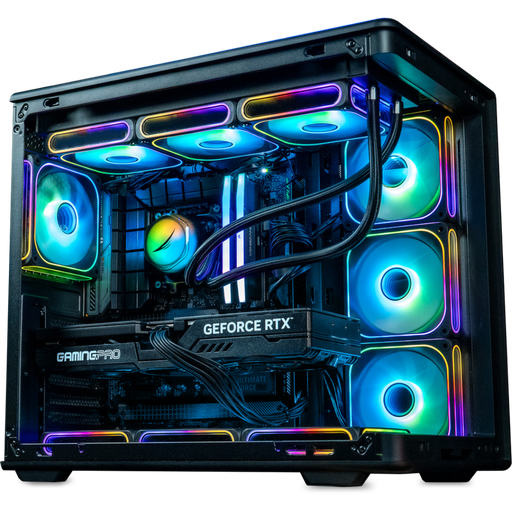
PC Gamora GeForce RTX 5070 Ti 16GB
Ryzen 7 7800X3D, RTX 5070 Ti 16 GB, 32 GB DDR5, 2 TB SSD. Our pick for Monster Hunter Wilds: AMD’s best gaming processor to handle busy areas, 16 GB of video memory for textures, and 2 TB for the game and its high-resolution pack.
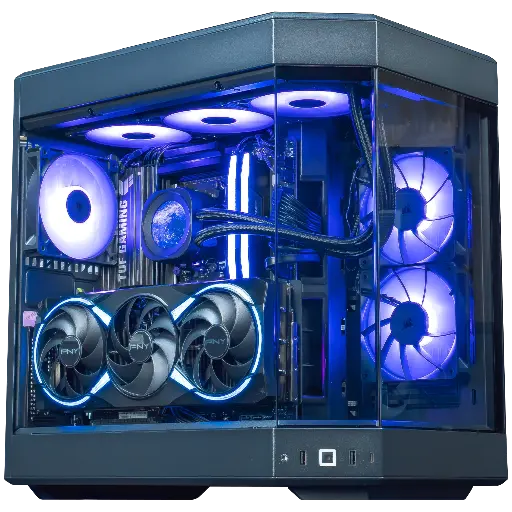
PC Orion GeForce RTX 5080
Ryzen 7 9800X3D, RTX 5080 16 GB, 32 GB DDR5, Samsung 990 EVO Plus 1 TB SSD, 360 mm watercooling. For full 1440p and 4K: the 9800X3D is today the most comfortable CPU for CPU-heavy games. It’s included in our Top Player selection for Black Friday.
Test of the PC Orion RTX 5080 on FlowUP’s YouTube channel.
Workshop review
- To get started with 1080p/1440p: the Aqua PC and its Ryzen X3D.
- For max settings at 1440p: the Gamora PC, our pick.
- For 4K and fast displays: the Orion PC.
- More than 50,000 PCs shipped since Genappe: if you’re stuck between two configurations, the team replies before you buy.
Also to read: two other very demanding recent games with our setup for Borderlands 4 and Assassin's Creed Shadows on PC, and a lighter PlayStation port with Ghost of Tsushima on PC.
Monster Hunter Wilds PC FAQ
What is the minimum configuration for Monster Hunter Wilds?
A GTX 1660 or an RX 5500 XT, a Core i5-10400, an i3-12100 or a Ryzen 5 3600, 16 GB RAM, and 75 GB on SSD. This minimum targets 720p at 30 FPS on Low, with upscaling set to Quality.
Do you need image generation to play Monster Hunter Wilds?
Capcom makes room in the recommended tier to hit 60 FPS at 1080p on the Medium preset. It helps, but a good CPU remains decisive in busy areas.
Why is Monster Hunter Wilds so heavy on the processor?
The RE Engine shows a dense open world with lots of enemies on screen. In camps and during hunts with multiple players, it’s the CPU that keeps things smooth: a Ryzen X3D makes a real difference.
How much video memory does Monster Hunter Wilds need?
At least 8 GB, but 12 to 16 GB are recommended for textures, especially with the high-resolution pack.
How much does Monster Hunter Wilds weigh on PC?
About 75 GB on an SSD, plus an optional high-resolution texture pack of about 19 GB.
Sources
- PCGamesN, Monster Hunter Wilds system requirements
- TechSpot, Monster Hunter Wilds recommends frame generation to reach 60 FPS
- WccfTech, Monster Hunter Wilds PC specs (SSD required, frame generation recommended)
