
By the FlowUP team, gaming PC builder in Genappe (Belgium) · Updated 26 November 2026
In short: choosing a black gaming PC starts with its case: it’s what determines the look, the noise level, and the space available for the graphics card. Black goes with everything, hides the cables, and lets you choose between a discreet gaming PC with no lighting, or an all-black PC with a touch of RGB. Our three picks: the PC Toyger in a mini-tower for 1080p, the PC Cheetoh for 1440p, our choice, and the PC Orion in the HYTE Y60 for 4K.
The vast majority of our builds go into a black case, and that’s no coincidence. A black PC doesn’t shout: it blends into the office, matches a monitor, a dark worktop or a TV unit, and it ages well.
You still need the black to be truly black. A black case with a grey graphics card, white cables and a silver heatsink quickly looks DIY. Here’s how to choose a successful all-black gaming PC, and which of our PCs built in Genappe tick all the boxes.
Why choose a black gaming PC?
- It blends into the room: on a desk, next to a TV, or in a bedroom, a black case draws less attention than a white one, or a very brightly lit “aquarium”.
- It hides the wiring: power cables are almost always black. In a black case, they disappear, even if your cable management isn’t perfect.
- The choice is wider: most cases, graphics cards, motherboards and liquid coolers come in black first. So you can aim for the best components without being limited to one colour version.
- One thing to know: dust shows up on black, especially on the glass panel and the top of the case. A quick wipe with a microfibre cloth now and then is enough, and our guide to cleaning your PC of dust explains how to do the inside.
The 4 things to check on a black gaming PC
A black gaming PC case isn’t everything. Here’s what we look at before we approve a black configuration in the workshop.
| Point | What to aim for | Why |
|---|---|---|
| Case | Black inside and out, tinted or panoramic window | A grey or white interior breaks the all-black effect |
| Cooling | Black air cooler or black liquid cooling | A silver radiator stands out immediately behind the glass |
| Graphics card | Black shrouds or dark grey | It’s the biggest visible part of the PC |
| Lighting | No RGB, adjustable RGB, or off via software | The same PC can stay discreet in the daytime and light up in the evening |
- Airflow comes before colour: a closed black case without a ventilated front panel heats up faster. Our guide for choosing your PC case details airflow and form factors.
- The window sets the mood: a dark tinted window makes for a very discreet PC, while a clear or panoramic window shows more of the components.
- Form factor matters too: a black mini-tower fits neatly on a desk, while a mid-tower leaves more room for larger graphics cards. Our article on the gaming PC case compares sizes.
Black gaming PC without RGB, or with just a bit of light?
That’s the real question with a black PC. Black makes subtle lighting stand out beautifully, but nothing forces you to turn anything on.
- The discreet gaming PC: no lighting, or RGB disabled in the BIOS or software. Perfect for a work office, a bedroom, or a streaming setup where you don’t want reflections.
- Black with a touch of colour: a single fixed colour, cool white, red or orange, on the fans or the liquid cooling. This is what we recommend most often: it stays elegant and can be set up with two clicks.
- Full RGB: on a black background, the effects stand out much more than in a white case. Our guide to the RGB gaming PC explains how to keep a bright PC that still performs well.
- RGB isn’t a must: on our PCs, the lighting can be controlled or switched off. Our tutorial on controlling the RGB on your PC shows you where to do it.
Are you mainly looking for a discreet PC for sensitive ears? That’s a different matter, covered in our article on the quiet gaming PC.
Our black gaming PCs: which one should you choose?
All our PCs are assembled, wired and tested in Genappe. The three configurations below come in black cases, from a mini tower to a showcase-style case.
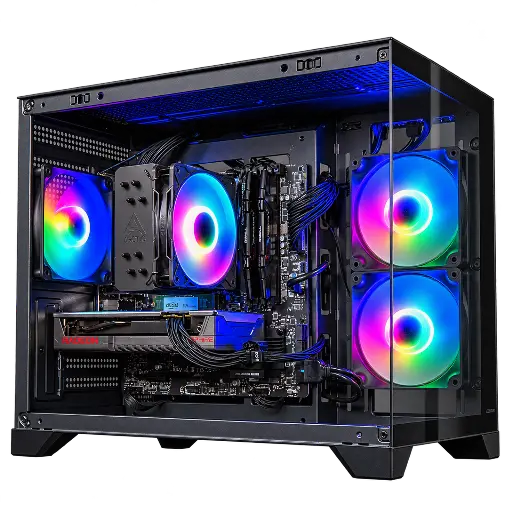
Toyger PC Radeon RX 9060 XT 8 GB
Ryzen 5 5600, RX 9060 XT 8 GB, 16 GB DDR4 (32 GB optioneel), Arctic Freezer 36 A-RGB air cooler, black Cougar FV150 mini-tower case. A small black PC for gaming at 1080p that fits on your desk without taking up space.
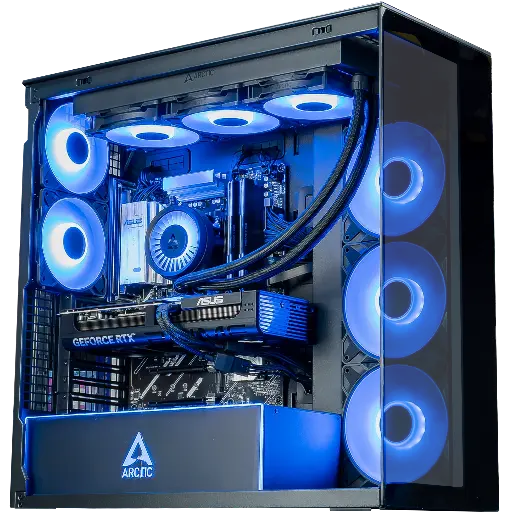
Cheetoh PC GeForce RTX 5070
Ryzen 7 7800X3D, RTX 5070, 16 GB DDR5 (32 GB optioneel), Arctic Liquid Freezer III Pro 360 ARGB watercooling, black Arctic Xtender case. Our pick for 1440p: a consistent all-black set-up, with lighting you can keep discreet.
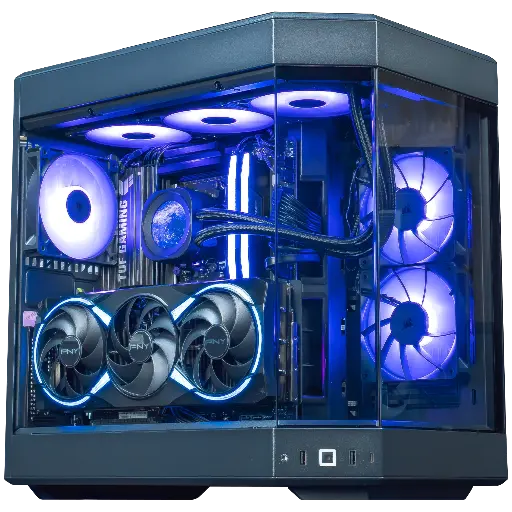
Orion PC GeForce RTX 5080
Ryzen 7 9800X3D, RTX 5080, 32 GB DDR5, Corsair Nautilus 360 RS ARGB watercooling, 1000 W 80+ Gold voeding, black HYTE Y60 case. The showcase PC for ultra 1440p and 4K: angled glass panels frame a fully black configuration.
- Small budget in black: the Bengal V2 PC RTX 5050 (Core i5-11400F, MSI MAG Forge M100R black) to get started in Full HD.
- The black with a panoramic window: the Abyssin RTX 5070 Ti PC (Core Ultra 7 265KF, 32 GB DDR5, MSI MAG PANO 100R PZ black) for 1440p with a view of the components.
- Black with airflow focus: the Blackwell RTX 5070 Ti PC (Core Ultra 5 245KF, MSI Coreliquid A13 360 black watercooling, MSI MAG Forge 340R Airflow black case).
Black-and-white gaming PC: the right compromise?
Some people want a black-and-white gaming PC: a black case with light components, or the other way around. It can look really good, as long as you choose a real contrast and stick with it across all the visible parts.
- Black case, white accents: a white fan or a sleeved white cable is enough to break up all that black without making it look cluttered.
- All white: if you’re more tempted by white than black, the Arctic RTX 5080 PC is our high-end light configuration.
- The showcase case: for a PC you can admire from every angle, our article on the aquarium PC presents cases with panoramic windows.
Workshop opinion
- For a small black PC in 1080p: the Toyger PC.
- For gaming for a long time in 1440p: the Cheetoh PC, our pick, ideally with the 32 GB option.
- For 4K and a PC that shows off: the Orion PC in the HYTE Y60.
- Our advice: choose the configuration according to your screen’s resolution, then the black case for style. A great case can’t make up for a graphics card that’s too underpowered.
- More than 50,000 PCs shipped from Genappe: if you can’t decide between two black configurations, the team will get back to you before you buy.
To see the Orion PC up close, black HYTE Y60 case included, along with the watercooling, here’s our bench test:
Test of the Orion RTX 5080 PC, assembled in Genappe.
Black gaming PC FAQ
Do black gaming PCs run hotter than white ones?
No, the case colour practically doesn’t change the temperatures inside a room. What matters is airflow: a ventilated front panel, enough fans, and cooling that’s suited to the processor.
Can you have a gaming PC without RGB?
Yes. On our PCs, the lighting can be adjusted or turned off in the BIOS or in the manufacturer’s software. You can keep a discreet black PC during the day, and then switch to a fixed colour at night if the mood takes you.
Which black gaming PC case should you choose?
A mini tower like the Cougar FV150 for a small desk, a mid tower like the Arctic Xtender for a 1440p setup, or a showcase case like the HYTE Y60 to put a powerful graphics card in the spotlight.
Do you see dust on a black PC?
Yes, more than on a white case, especially on the window and the top. A microfiber cloth now and then is enough for the outside, and cleaning the filters every three to six months keeps the inside clean.
Is a black gaming PC more expensive?
In general, no: black is the base colour for most components. It’s usually the white versions that sometimes cost a little more.
