
By the FlowUP team, gaming PC builder in Genappe (Belgium) · Updated 17 November 2026
In short: On PC, Resident Evil Requiem needs at least a GTX 1660 or an RX 5500 XT, a Core i5-8500 or a Ryzen 5 3500, 16 GB of RAM and Windows 11. The game is well optimised in standard rendering, but ray tracing, and especially path tracing, changes everything. Our pick for 1440p with ray tracing: the PC Rampage (RTX 5070, 32 GB of RAM).
A poorly lit corridor, a noise behind a door, and that urge to absolutely not move forward. Resident Evil Requiem, the ninth main instalment in the series (hence the searches “Resident Evil 9 PC”), launched on 27 February 2026, and Capcom has put care into its PC version: RE Engine, DLSS 4, path tracing.
You don’t need a war machine to play it: it all depends on how far you want to push the lighting. Here are the required specs, the measured FPS card by card, and the PCs we build in the workshop for Resident Evil Requiem on PC.
Resident Evil Requiem required specifications: what Capcom asks for
Capcom publishes two tiers, without specifying the resolution or the targeted frame rate. The last column is what we assemble in Genappe so you can play without thinking about it.
| Component | Minimum | Recommended | Workshop tip |
|---|---|---|---|
| Processor | Core i5-8500 or Ryzen 5 3500 | Core i7-8700 or Ryzen 5 5500 | Latest Ryzen 7 or Core Ultra |
| Graphics card | GTX 1660 (6 GB) or RX 5500 XT (8 GB) | RTX 2060 Super (8 GB) or RX 6600 (8 GB) | RTX 5070 or RX 9070 XT |
| System memory | 16 GB | 16 GB | 32 GB |
| System | Windows 11, 64-bit | Windows 11, 64-bit | Windows 11 |
| DirectX | 12 | 12 | 12 |
| Storage | Not specified | Not specified | 1 TB NVMe SSD or more |
Source: configuration published by Capcom (relayed by DSOGaming and Beebom). Last column: FlowUP workshop choice.
- Windows 11 is mandatory: a PC still running Windows 10 won’t meet the requirement.
- The recommended spec sheet lists cards from 2019 and 2021. It guarantees the game launches, without ray tracing.
- The game uses Denuvo, which limits the number of installations on different machines. No impact for a player on a single PC.
Which graphics card for Resident Evil Requiem at 1080p, 1440p and 4K?
The figures below come from TechPowerUp’s test, reproduced by Pause Hardware: maximum preset, no ray tracing and no upscaling. This is the best way to compare the cards with each other.
| Graphics card | 1080p | 1440p | 4K |
|---|---|---|---|
| RTX 5090 | 278 FPS | 234 FPS | 148 FPS |
| RX 9070 XT | 219 FPS | 156 FPS | 85 FPS |
| RTX 5070 Ti | 200 FPS | 142 FPS | 82 FPS |
| RTX 5070 | 162 FPS | 114 FPS | 61 FPS |
| RX 9060 XT 16 GB | 128 FPS | 86 FPS | 44 FPS |
| RTX 5060 Ti 16 GB | 121 FPS | 84 FPS | 44 FPS |
| RTX 5060 Ti 8 GB | 118 FPS | 84 FPS | 23 FPS |
Source: TechPowerUp via Pause Hardware, Max preset, native rendering. Rounded averages.
- In 1080p, all recent cards well exceed 100 FPS. The RE Engine remains a well-optimised engine.
- In 1440p, an RX 9060 XT or an RTX 5060 Ti is enough to play above 80 FPS without ray tracing.
- In native 4K, you need at least an RTX 5070 to hold 60 FPS, and the RX 9070 XT performs better than the RTX 5070 Ti.
- Look at the last row: in 4K, the RTX 5060 Ti 8 GB drops to 23 FPS, compared with 44 FPS for the 16 GB version. We come back to this lower down.
To choose between these NVIDIA cards, our comparison RTX 5070, RTX 5060 or RTX 5070 Ti explains the differences in price and performance.
Ray tracing and path tracing: what it really costs
This is where Resident Evil Requiem becomes demanding. Ray tracing makes reflections and shadows more believable, while path tracing calculates all the light in the scene. In a horror game where everything happens in the dark, you can clearly see the difference.
With ray tracing, the graphics card does most of the work in Resident Evil Requiem.
- Ray tracing on High costs 40 to 55% of the FPS, depending on the card in TechPowerUp’s test. In native 1440p: 79 FPS for the RTX 5070 Ti, 76 FPS for the RX 9070 XT, 61 FPS for the RTX 5070, 44 FPS for the RTX 5060 Ti 16 GB.
- Path tracing was measured on the RTX 50 with DLSS Quality and frame generation x2: 98 FPS at 1440p for the RTX 5070 Ti, 75 FPS for the RTX 5070, 54 FPS for the RTX 5060 Ti 16 GB.
- In 4K with path tracing, the RTX 5070 drops to 22 FPS. The RTX 5070 Ti, at 54 FPS, is the real starting point.
- From the PC Gamers’ side, an RTX 5090 in 4K with DLSS Performance goes from 157 FPS with High ray tracing to 77 FPS in path tracing.
Our take: classic ray tracing is the best compromise. Path tracing is worth it from an RTX 5070 Ti onwards at 1440p. If these terms are still a bit fuzzy, our guide ray tracing and path tracing explains them in simple terms.
Video memory: do 8 GB suffice for Resident Evil Requiem?
Yes at 1080p and 1440p without ray tracing. No once you go for 4K or ray tracing. The video memory readings from Pause Hardware are clear:
- About 10 GB at 1080p on the maximum preset.
- About 12 GB in 4K, 15 GB in 4K with High ray tracing, and over 17 GB in 4K with path tracing and frame generation.
- At the lowest preset, usage drops to under 6 GB in 1080p, and to under 7 GB in 4K.
On an 8 GB card, the margin disappears quickly. In 4K with ray tracing, the RTX 5060 Ti 8 GB drops to 10 FPS versus 22 FPS for the 16 GB version. For a PC you keep for several years, we recommend at least 12 GB, and 16 GB to be safe. The topic is covered in our guide 8, 12 or 16 GB of VRAM and in the comparison RX 9060 XT 8 GB or 16 GB.
Processor and RAM: no need to go too high
- The processor: the official spec sheet only goes up to a Ryzen 5 5500 or a Core i7-8700. A recent 6-core model is more than enough. The game is mainly limited by the graphics card.
- RAM: Capcom asks for 16 GB, even at the recommended tier. In our PCs, we prefer 32 GB: a browser, Discord and a capture software will always end up running at the same time as the game. Our guide 16 GB or 32 GB of RAM lays it out.
- The SSD: Capcom doesn’t specify an installation size in its spec sheet. An NVMe SSD with some headroom is still our recommendation for short loading times.
Settings that really boost FPS
- DLSS or FSR in Quality mode: this is the first lever. An RTX 5070 Ti at 1440p with High ray tracing goes from 70 FPS native to 96 FPS with DLSS Quality. A RX 9070 XT goes from 77 to 112 FPS with FSR Quality.
- Frame generation x2: the same RTX 5070 Ti climbs to 169 FPS. PC Gamer measures 5 to 10 ms extra latency, acceptable in a horror game with a calm pace.
- Generation x3 and x4: latency goes beyond 30 ms depending on PC Gamer. You want to avoid that.
- Normal ray tracing instead of High: on an RX 7900 XT in 4K, PC Gamer gains 10 to 15 FPS.
- XeSS isn’t offered: on an Intel Arc card, use FSR instead.
PC Gamer also reports small stutters the first time an object or action appears. No setting eliminates them. To fine-tune upscaling properly, our guide DLSS 4.5 and FSR Redstone explains what to enable and what to avoid.
Our PCs for Resident Evil Requiem: which one to choose?
These three PCs have been assembled, cabled and tested in Genappe, and they ship with Windows 11. Each one matches a specific Resident Evil Requiem configuration: classic rendering, ray tracing or path tracing.
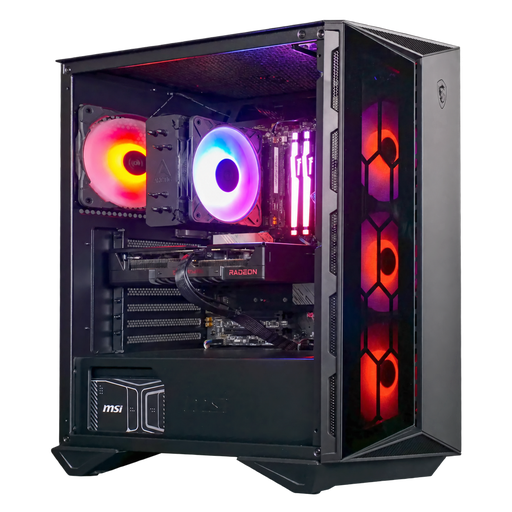
PC Moll-E Radeon RX 9060 XT 16GB
- Ryzen 5 7500F (6 cores), RX 9060 XT 16 GB
- 16 GB of DDR5, 1 TB SSD
- MSI 750 W 80 Plus Gold power supply
To play at maximum 1080p and above 80 FPS at 1440p without ray tracing. Its 16 GB of video memory avoid the trap of 8 GB cards.
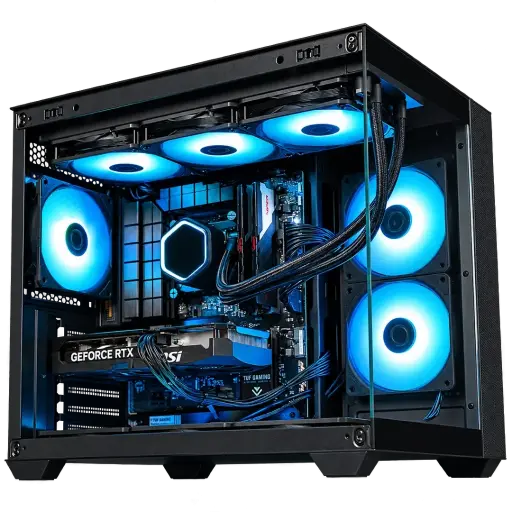
PC Rampage GeForce RTX 5070
- Ryzen 7 5700X (8 cores), RTX 5070 12 GB
- 32 GB of RAM, 1 TB SSD
- Cooler Master 750 W power supply
Our pick for Resident Evil Requiem: 1440p with ray tracing and DLSS, and 32 GB of RAM to keep your applications open.
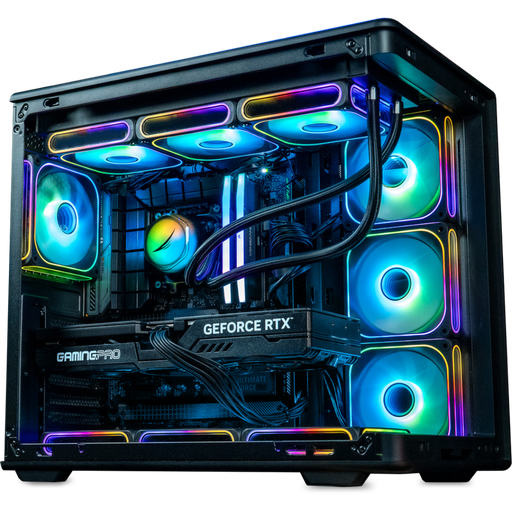
Gamora PC GeForce RTX 5070 Ti 16GB
- Ryzen 7 7800X3D, RTX 5070 Ti 16GB
- 32GB of DDR5, 2TB SSD
- MSI B850 motherboard
For path tracing at 1440p: 98 FPS with DLSS Quality and frame generation in the TechPowerUp test, and 16GB of video memory to run at 4K.
Workshop review
- For gaming at 1080p or 1440p without ray tracing: the Moll-E PC.
- For 1440p with ray tracing: the Rampage PC.
- For path tracing and 4K with DLSS: the Gamora PC.
- Over 50,000 PCs shipped from Genappe: if you’re torn between two configurations, the team replies before you buy.
Resident Evil Requiem FAQ on PC
What is the minimum configuration for Resident Evil Requiem?
An i5-8500 Core or Ryzen 5 3500, a 6GB GTX 1660 or an 8GB RX 5500 XT, 16GB RAM, 64-bit Windows 11, and DirectX 12. Capcom does not specify the resolution or the target FPS for this minimum.
Does Resident Evil Requiem run on Windows 10?
No, the official spec requires 64-bit Windows 11, at a minimum as well as recommended.
Which graphics card for Resident Evil Requiem at 1440p?
Without ray tracing, an RX 9060 XT or an RTX 5060 Ti will handle over 80 FPS at the maximum preset. With ray tracing, aim for a RTX 5070 or RX 9070 XT, with DLSS or FSR in Quality mode.
Can you enable path tracing on an RTX 5060 Ti?
Yes, the 16GB version delivers 77 FPS at 1080p and 54 FPS at 1440p with DLSS Quality and frame generation x2 in the TechPowerUp test. For path tracing at 1440p without compromises, the RTX 5070 Ti is more comfortable.
Is 8GB of video memory enough for Resident Evil Requiem?
Yes at 1080p and 1440p without ray tracing. At 4K or with ray tracing becomes 8GB a bottleneck: aim for 12 to 16GB.
